Tech & Wi-Fi
Why Stable Onboard Internet Matters for Every Trip
Discover why stable onboard internet matters for remote work. Avoid frustration and optimize your sea travel experience today!
29 May 2026
Why Stable Onboard Internet Matters for Every Trip
TL;DR:
- Stable, low-latency onboard internet is essential for remote work at sea, outweighing mere download speed.
- Satellite coverage, weather, and shared bandwidth challenge connection reliability, making preparation and testing crucial before departure.
Most travelers write off spotty ship Wi-Fi as a minor inconvenience. Remote workers, on the other hand, know better. When a video call freezes mid-sentence or a VPN refuses to connect halfway through the Mediterranean, the problem stops being annoying and starts costing you real time and real money. Understanding why stable onboard internet matters, and not just fast internet, changes how you prepare for any journey at sea. This guide breaks down the technical realities, the regulations, and the practical steps that make the difference between a productive crossing and a frustrating one.
Table of Contents
- Key takeaways
- Why onboard connectivity is uniquely difficult
- Why stability matters more than speed at sea
- Onboard internet as a regulatory and welfare matter
- How technology and providers address stability
- Practical tips for getting the best connection onboard
- My take on what stable connectivity actually changes
- Stay connected on your next crossing with Seafy
- FAQ
Key takeaways
| Point | Details |
|---|---|
| Stability beats speed | Consistent, low-latency connections matter more than raw download speed for remote work. |
| Satellite geography affects quality | Physical terrain and satellite position can disrupt your signal, regardless of the ship’s hardware. |
| It’s a welfare right, not a perk | Maritime law frames crew internet access as a welfare requirement, not an optional service. |
| Technology is improving fast | Modern LEO satellite systems cut latency dramatically, enabling real-time tasks at sea. |
| Preparation makes a big difference | Testing your tools before departure helps you avoid surprises when you’re out of port. |
Why onboard connectivity is uniquely difficult
Getting online at home or in a café is simple. You tap a network, enter a password, and you’re done. At sea, the entire equation changes. Every byte of data you send or receive travels through a satellite link, not a cable or a cell tower nearby.
Ship connectivity depends on line-of-sight between the ship’s antenna and a satellite in orbit. That link gets tested constantly by weather, your location, and the movement of the vessel itself. Here’s what specifically works against a stable connection at sea:
- Satellite coverage gaps: Some remote ocean routes simply sit outside reliable satellite footprints. Coverage that works perfectly in the western Mediterranean can weaken significantly further offshore.
- Physical obstructions: Sailing through Norwegian fjords or close to steep coastlines can physically block the satellite signal. It’s the same reason your phone loses signal in a tunnel.
- Latency variability: Older maritime satellite systems produce latency between 600 and 800 milliseconds. That kind of delay makes video calls choppy and VPNs unreliable, even when speeds look acceptable on paper.
- Shared bandwidth: Dozens or hundreds of passengers sharing one satellite connection means that peak usage times, usually evenings, can slow everyone down considerably.
- Weather interference: Heavy rain, storms, and atmospheric conditions degrade the signal between ship and satellite in ways that land-based internet users almost never experience.
Speed test numbers alone don’t tell the whole story. You might see a decent download speed right before a call drops because unstable internet disrupts latency-sensitive applications far more than it disrupts simple browsing or downloads. Understanding this distinction helps you plan smarter.
Why stability matters more than speed at sea
Here’s a framing that shifts how most people think about this. Downloading a movie or syncing emails can tolerate brief interruptions. The file just waits and resumes. Real-time communication is completely different. A one-second delay or a two-second dropout in a video call is not recoverable. Your colleagues hear garbled audio, your screen freezes, and trust in the connection evaporates.
For remote workers specifically, trust in connectivity is what determines whether you treat a crossing as productive work time or mandatory downtime. When you can’t predict whether the internet will hold, you stop scheduling meetings. You stop submitting deliverables with tight deadlines. You essentially write off the journey.
Here are the workflows that suffer most without a stable connection:
- Video conferencing (Zoom, Google Meet, Teams): These tools require low, consistent latency. Even brief packet loss causes audio artifacts and video freezes that make professional calls difficult.
- VPN access to corporate networks: Many enterprise VPNs treat high-latency satellite links as suspicious or time out automatically, cutting you off from the files and apps you need.
- Cloud-based collaboration tools: Apps like Figma, Notion, or Google Docs push changes in real time. An unstable connection creates sync conflicts and lost edits.
- Live customer or client communication: Whether you’re in sales, support, or consulting, any real-time interaction with a client demands a connection you can count on.
Pro Tip: Before your departure, run a short video call over your planned VPN setup from a tethered mobile connection to confirm everything works. Spotting a compatibility issue at home is far less stressful than discovering it mid-crossing.
Onboard internet as a regulatory and welfare matter
The conversation around why stable onboard internet matters has moved well beyond passenger convenience. It now sits firmly in the space of law and crew welfare.
The UK Maritime and Coastguard Agency published MGN 707 guidance in 2026, addressing internet access under the Maritime Labour Convention. The guidance frames social connectivity at sea as a welfare requirement, not a discretionary service. For ship operators, this means providing reasonable internet access is an obligation, not a bonus offering.
“Seafarers working long contracts away from home use internet access to maintain relationships, manage finances, and support their mental health. Removing or degrading that access has direct welfare consequences.”
The significance of satellite internet for crew extends beyond casual browsing. Crew members use onboard connectivity to call family, access healthcare information, and stay informed. When that connection is unstable or unavailable, isolation increases and morale drops. There is also a nuanced flip side. Stable connections can increase staff fatigue if work bleeds into rest periods, which makes responsible network management critical. It’s not just about switching on the signal and calling it done.
How technology and providers address stability

Ships don’t just rely on a single antenna pointed at a single satellite. Modern maritime systems use multiple antennas that continuously scan for the strongest available signal, automatically switching between satellites to minimize dropout time. Weather, satellite position, and user consumption all affect performance, so network management becomes as important as the hardware itself.
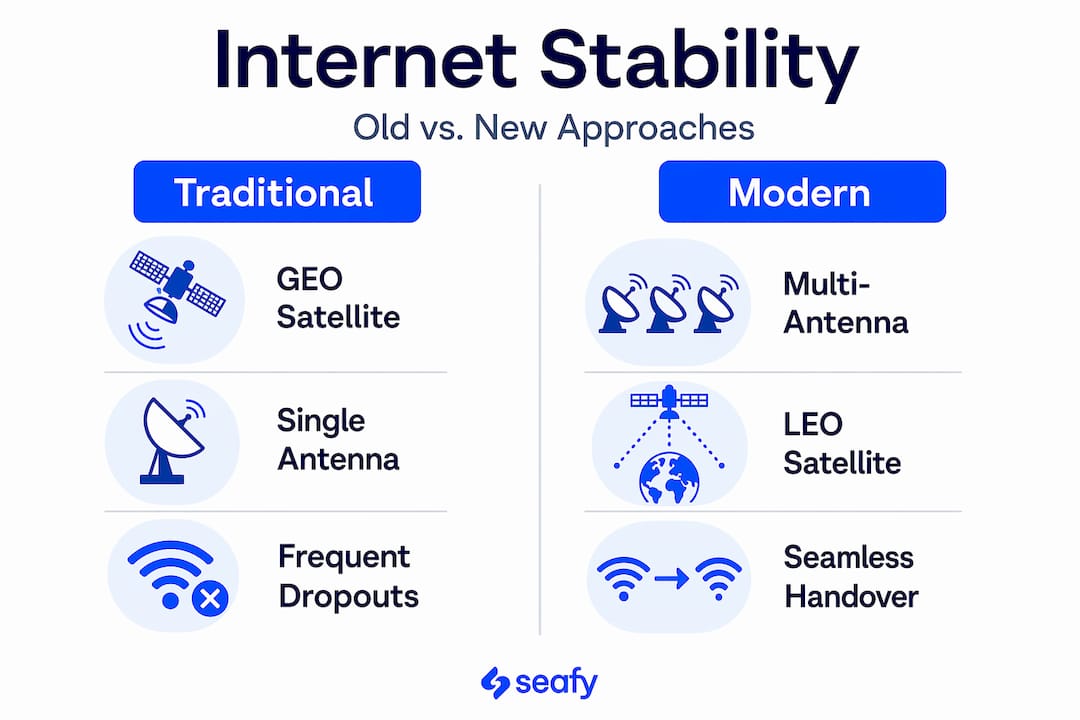
Here’s how different approaches to maritime connectivity compare:
| Approach | Benefit | Limitation |
|---|---|---|
| Traditional GEO satellite | Wide coverage, well established | High latency (600-800 ms), limited speed |
| LEO satellite (e.g., Starlink) | Low latency (<50 ms), faster speeds | Still expanding coverage in some regions |
| Dual-provider redundancy | Reduces single-point dropout risk | Higher cost for operators |
| Traffic shaping and prioritization | Keeps critical tasks running smoothly | May throttle heavy downloads at peak times |
Seafy integrates with satellite technologies like Starlink to offer reliable onboard internet across its partner ferry lines, including Corsica Ferries, Grimaldi Lines, and GNV. Passengers can purchase and activate Wi-Fi packages directly through the seafy.com portal, without hunting down a crew member or dealing with confusing onboard systems. The platform is built for travelers who need it to just work.
Pro Tip: Check your package type before boarding. Some onboard plans prioritize browsing and messaging. If you need video calling or VPN access, look for plans specifically designed for remote work use cases. ⚡
Practical tips for getting the best connection onboard
Knowing why stable onboard internet matters is half the battle. The other half is preparing to work with the realities of maritime connectivity rather than against them.
- Test everything before you leave port. Run your VPN, open your work apps, and place a test video call while you still have cell coverage at the dock. Once you’re at sea, troubleshooting options shrink.
- Schedule demanding tasks early. Evening hours tend to bring the most passenger traffic to the network. Morning windows, especially before 9 a.m., typically offer better performance.
- Download what you can beforehand. Presentations, reference documents, playlists, and streaming content you’ll need offline should be saved to your device before departure. This also frees up shared bandwidth for others.
- Understand your plan’s limits. Data plans and traffic prioritization vary widely by provider. Know your data cap and what activities might be throttled.
- Have an offline backup plan. Even the best maritime connection has occasional gaps. A downloaded playlist, an offline-capable app, or a good book keeps you productive and relaxed when the signal dips.
My take on what stable connectivity actually changes
I’ve watched how people’s relationship with sea travel shifts the moment they know they can rely on their internet connection. The anxiety around productivity just lifts. Suddenly, a four-hour ferry crossing becomes a genuine option for a morning of deep work, not a gamble.
What I’ve noticed is that most travelers underestimate connection quality until they’ve been burned once. Remote workers who’ve had a critical call drop mid-sentence in open water don’t make the same mistake twice. They start asking the right questions before they book: What satellite system is on this route? Is there a remote work plan available?
I’ve also seen the flip side. A few professionals I know have started over-relying on onboard internet and extending their working hours into what should be rest time at sea. The best use of reliable connectivity at sea is intentional. Use it well, protect your downtime, and let the experience of being on the water stay part of the trip.
The industry still has gaps, especially on routes through remote areas or during high-demand crossings. But the direction is clear and the technology is improving quickly. If you choose providers who invest in the right infrastructure, the experience today is genuinely good.
— Raffaele
Stay connected on your next crossing with Seafy
If you’re planning a Mediterranean ferry route and onboard internet connectivity is on your checklist, Seafy makes the whole process simple.

Seafy partners with leading ferry lines including Corsica Ferries, Grimaldi Lines, and GNV to bring you reliable, high-speed Wi-Fi across major routes. You can browse available packages and activate your connection directly through the seafy.com portal before or during your journey. No complicated setup. No hunting down instructions. Just connect and go. Whether you’re catching up on work, streaming your favorite show, or keeping in touch with family, Seafy is designed to make sure the connection holds. Check out your options at seafy.com and travel with one less thing to worry about.
FAQ
What makes onboard internet different from home Wi-Fi?
Onboard internet relies entirely on satellite links rather than fixed cables or cell towers, making it vulnerable to coverage gaps, weather interference, and shared bandwidth across all passengers.
Why does latency matter more than speed for remote work at sea?
Latency determines whether real-time tools like video calls and VPNs function correctly. A slow but stable connection often outperforms a fast but inconsistent one for interactive tasks.
Is internet access a right for ship crew members?
Yes. The UK Maritime and Coastguard Agency’s MGN 707 guidance positions social connectivity and internet access as a crew welfare requirement under the Maritime Labour Convention, not a discretionary service.
How can I prepare for remote work on a ferry or cruise ship?
Test your VPN and video call tools before boarding, download essential files offline, and choose a Wi-Fi package designed for work use rather than basic browsing.
Does Seafy work on all Mediterranean ferry routes?
Seafy currently partners with Corsica Ferries, Grimaldi Lines, and GNV, covering major Mediterranean routes. Check seafy.com directly for current coverage and available packages on your specific route.