Tech & Wi-Fi
Accessing Digital Services on Ships: Passenger and Crew Guide
Discover essential tips for accessing digital services on ships. Connect easily onboard and stay in touch while enjoying your journey!
27 May 2026
Accessing Digital Services on Ships: Passenger and Crew Guide
TL;DR:
- Accessing digital services at sea has become essential for passengers and crew alike, with platforms like Seafy simplifying connectivity.
- Ship Wi-Fi costs vary, and satellite signals can be unreliable in certain geographic areas or during peak hours, requiring offline preparations.
Whether you are crossing the Mediterranean on a Grimaldi Lines ferry or spending weeks at sea as a crew member, accessing digital services on ships is no longer a luxury. It is something most people genuinely depend on, from video calls home to submitting work files on deadline. The gap between what you expect and what ships actually deliver can be frustrating if you are unprepared. This guide covers what you need to know before you board, how to connect once you are onboard, and how to get the most out of maritime digital services in 2026.
Table of Contents
- Key takeaways
- What to prepare before boarding for digital access
- How to connect and use digital services onboard
- Common limitations and troubleshooting at sea
- Making the most of digital connectivity at sea
- My take on crew connectivity
- Stay connected at sea with Seafy
- FAQ
Key takeaways
| Point | Details |
|---|---|
| Prepare before boarding | Download apps, set up accounts, and understand your ship’s Wi-Fi packages before you leave port. |
| Enable airplane mode first | Switch to airplane mode and connect via Wi-Fi to avoid roaming charges at sea, which can exceed $20 per day. |
| Use Seafy for easy access | Seafy’s portal lets passengers and crew purchase and activate Wi-Fi packages directly onboard without complicated setup. |
| Expect coverage gaps | Satellite signal can drop in fjords or near mountainous terrain. Offline backups protect your work and entertainment. |
| Crew needs extra planning | Crew members typically pay separately for Wi-Fi and face tighter bandwidth limits than passengers, so planning usage matters. |
What to prepare before boarding for digital access
Good connectivity at sea starts well before you step onto the gangway. Knowing what to expect and setting up the right tools in advance saves real time and money once you are underway.
Devices and compatibility: Most ship Wi-Fi systems work with any standard device, including smartphones, tablets, and laptops. Make sure your device connects to standard 2.4 GHz and 5 GHz networks. If you are traveling with multiple devices, check whether your chosen Wi-Fi plan allows multi-device use before you purchase.
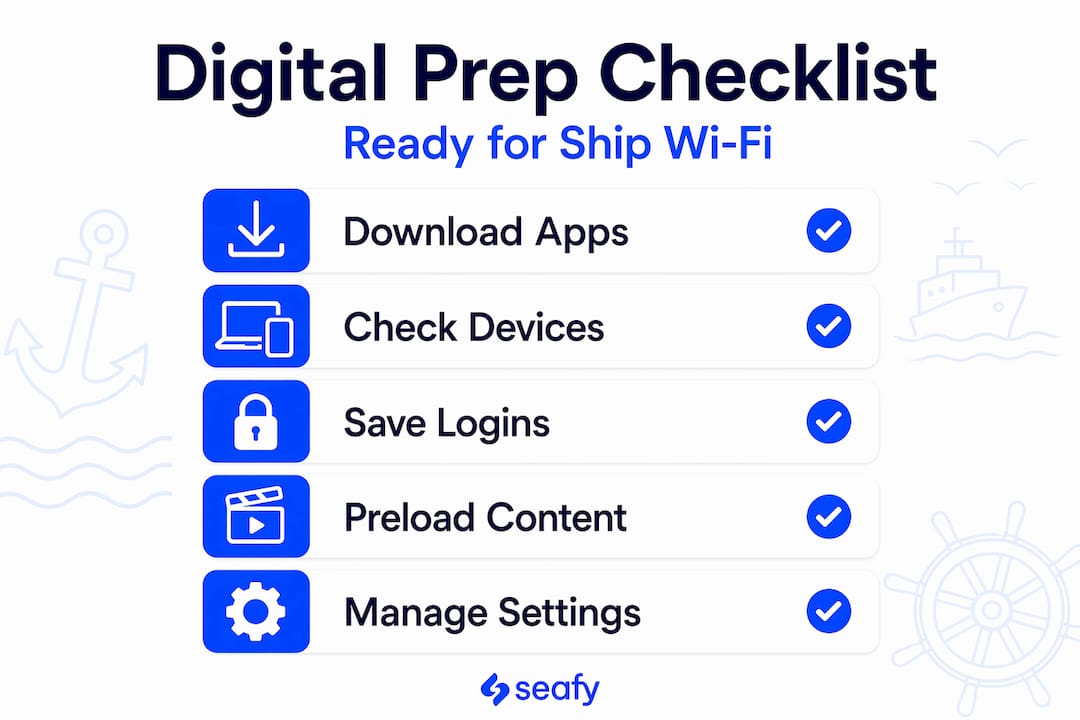
Understanding costs: Cruise ship Wi-Fi typically costs $15 to $30 per day on major lines, though some luxury operators bundle unlimited access into the base fare. Ferry routes tend to offer shorter, more affordable packages. On platforms like Seafy, you can browse and compare available plans ahead of sailing so there are no surprises at the onboard portal.
Apps and accounts to set up in advance:
- Download your video call app of choice and test it before departure
- Set up cloud storage so large files sync before you lose a fast connection
- Pre-load entertainment (podcasts, playlists, offline maps) for moments when the signal is weak
- If you use a VPN for work, confirm it is configured and working on your device
Pro Tip: Download any streaming content you want for the crossing before you board. Onboard bandwidth is shared across all passengers, and peak hours like evenings can slow speeds considerably.
Managing expectations honestly matters here. Over 38,300 vessels now use satellite broadband, and speeds have improved dramatically, but you are still sharing a satellite link with everyone else on the ship. Plan for it.
How to connect and use digital services onboard
Once you are on board, connecting to ship Wi-Fi and getting your digital services running is straightforward if you follow the right steps. Here is how to do it without wasting time or money.
-
Put your phone or device in airplane mode. Do this the moment you feel land fading. Cellular roaming on ships is not covered by standard mobile plans, and the charges add up fast.
-
Connect to the ship’s Wi-Fi network. You will typically find it listed as the ship’s name or a carrier-branded network. Open your device’s Wi-Fi settings and select it.
-
Open a browser and navigate to the portal. Most ship networks redirect you automatically to a captive portal page. If they do not, try visiting a simple URL to trigger the redirect.
-
Visit seafy.com to purchase or activate your plan. On vessels partnered with Seafy, including those operated by Corsica Ferries and GNV, you can log in, select a plan that fits your needs, and activate it within minutes. No app download required.
-
Connect your additional devices. If your plan covers multiple devices, repeat the connection process for each one using the same account credentials.
-
Monitor your data usage. Check your remaining data through the Seafy portal or the ship’s Wi-Fi management interface. Some plans cap usage or throttle speeds once you hit a limit.
Pro Tip: If you need to join a video call during your crossing, schedule it for the morning when fewer passengers are online. The shared satellite bandwidth is noticeably faster during off-peak hours.
Accessing ship apps and digital entertainment works the same way. Once your Wi-Fi plan is active, you can stream, browse the ship’s onboard entertainment portal, or check in with work tools just like you would on land, with some patience built in.
Common limitations and troubleshooting at sea
Even the best shipboard internet solutions have real-world limitations. Knowing them in advance means you can plan around them rather than be caught off guard.
- Signal drops in specific geography. Ships lose satellite connectivity predictably near Norwegian fjords, behind mountains, or in remote sea corridors where satellite geometry is poor. These outages are temporary but can last 15 to 45 minutes.
- Peak-time slowdowns. Evenings are the worst. When 800 passengers all want to stream at once, the shared satellite link feels it. Downloading or uploading large files in the early morning is a smarter move.
- Crew vs. passenger experience. Crew members typically access separate Wi-Fi networks with tighter bandwidth caps and slower speeds. Some lines charge crew as much as $4 per day just for basic social media access.
- Device reconnection issues. Devices sometimes drop the portal session after inactivity. Simply reconnect to the Wi-Fi network and re-authenticate through the portal.
Ships use hyperconverged edge computing to keep critical systems running during satellite outages, but that infrastructure is primarily for navigation and operations, not passenger Wi-Fi. When the satellite link drops, your connection drops with it.
If you run into persistent problems, most ships have a customer service desk or a help link within the Wi-Fi portal itself. On Seafy-enabled vessels, support is accessible through the platform interface.
Making the most of digital connectivity at sea
Setting realistic expectations leads to a much better experience. Here is a practical comparison of what works well versus what works less reliably onboard:
| Use case | Works reliably | Works with limitations |
|---|---|---|
| Messaging and email | ✅ Yes | |
| Video calls (off-peak) | ✅ Yes | |
| Video calls (peak hours) | ⚠️ Slower, may drop | |
| Streaming HD video | ⚠️ Depends on load | |
| Cloud file uploads | ✅ Small files | ⚠️ Large files slow |
| Remote work (light tasks) | ✅ Yes | |
| Online gaming | ⚠️ High latency |
The adoption of Starlink by major carriers has changed the picture considerably. Royal Caribbean and others have moved to SpaceX’s low-earth-orbit satellite systems, which deliver faster speeds and lower latency than traditional VSAT systems. Seafy also integrates Starlink technology to give passengers more reliable access on supported routes.
For security, always use HTTPS websites and consider a VPN for sensitive work tasks. Public ship Wi-Fi networks carry the same risks as any public hotspot. The digital seafarer generation relies on onboard internet for career development and wellbeing, which makes protecting that connection just as important as having it.
My take on crew connectivity
I’ve spent years looking at how digital access plays out across different passenger and crew experiences at sea, and one thing stands out consistently: the gap between what passengers receive and what crew members deal with is wider than most people realize.
Passengers get polished portals, reasonable pricing, and customer support. Crew members, on the other hand, often pay out of pocket for slow, capped access that barely supports a video call home. I’ve seen crew members on long voyages unable to stay in touch with family for days at a stretch because bandwidth was reserved for passenger use or the cost made daily use impossible.
The technology is clearly there to do better. Reliable internet for seafarers is not a perk. It directly affects morale, mental health, and even safety awareness. My honest view is that any operator investing in Starlink upgrades and improved passenger Wi-Fi should be extending meaningful access to crew as part of the same infrastructure investment. The cost difference is marginal. The human impact is not.
— Raffaele
Stay connected at sea with Seafy
Ready to get online the moment you board? Seafy makes it simple.

Seafy is the go-to platform for high-speed internet access on ferries and cruise ships across the Mediterranean and beyond. Whether you are a passenger on a Corsica Ferries crossing or a crew member looking for a reliable way to stay connected, Seafy offers easy-to-activate Wi-Fi packages at sea with no complicated setup. Just connect, visit the portal, choose your plan, and you are online. With partnerships across major ferry lines, including GNV and Grimaldi Lines, and Starlink-powered coverage on supported routes, Seafy has you covered. ⚡
FAQ
How do I get internet access on a ship?
Connect to the ship’s onboard Wi-Fi network, then open a browser to reach the portal. On Seafy-enabled vessels, you can purchase and activate a plan directly through the Seafy platform at seafy.com.
How much does Wi-Fi cost on ships?
Standard shipboard Wi-Fi costs between $15 and $30 per day on cruise ships, while ferry routes often offer shorter and more affordable packages. Some luxury lines include Wi-Fi in the base fare.
Why does my ship Wi-Fi keep dropping?
Signal drops are often caused by geographic interference at sea, such as fjords or mountainous coastlines that block satellite signals. Outages are usually brief. Reconnecting to the portal typically restores access.
Can crew members access digital services on ships the same way passengers do?
Not always. Crew typically access separate bandwidth-limited networks and often pay higher rates per day for fewer features. Platforms like Seafy are working to provide better options for crew welfare and connectivity.
Is it safe to use public Wi-Fi on a ship?
Ship Wi-Fi carries the same risks as any public network. Use HTTPS sites and a VPN for sensitive tasks. Avoid logging into banking apps unless you are on a secured, private connection.