Tech & Wi-Fi
Why reliable Wi-Fi matters for your Mediterranean voyage
Discover the importance of reliable Wi-Fi for travelers on your Mediterranean voyage. Stay connected at sea for work, leisure, and more!
18 May 2026
Why reliable Wi-Fi matters for your Mediterranean voyage
TL;DR:
- Reliable Wi-Fi aboard Mediterranean ships is now more accessible due to advanced satellite technology and flexible planning. Travelers should optimize usage by combining ship Wi-Fi with regional eSIMs, downloading offline content, and applying security measures like VPNs to ensure productive and secure connectivity. Proper understanding of onboard internet limitations and smart strategies can transform a frustrating experience into a manageable, even enjoyable, digital presence at sea.
Reliable Wi-Fi for travelers is no longer a nice-to-have, especially when your journey involves days at sea between Italian ports, Greek islands, or North African coastlines. You might assume that ship internet is universally slow and overpriced. That assumption is increasingly outdated. Satellite technology has changed dramatically, costs have become more predictable, and smart planning can make the difference between a connected, productive crossing and a frustrating experience. Whether you need to send a work email, stream a show, or video call home from the Adriatic, what you know before you board matters. 🌐
Table of Contents
- Why reliable Wi-Fi matters for travelers on Mediterranean ferries and cruises
- Understanding onboard internet technology and its limitations
- Comparing onboard Wi-Fi with eSIM and other connectivity options
- Best practices for maintaining a reliable Wi-Fi connection and security onboard
- Meeting remote work internet requirements while cruising the Mediterranean
- Rethinking the conventional wisdom on cruise and ferry Wi-Fi reliability ⚡
- How Seafy makes reliable Wi-Fi simple for Mediterranean ferry and cruise travelers
- Frequently asked questions
Why reliable Wi-Fi matters for travelers on Mediterranean ferries and cruises
Having introduced the growing necessity of Wi-Fi onboard, let’s explore why dependable connectivity truly matters to Mediterranean travelers.
Your experience onboard depends heavily on what you need the internet for. Not all usage is equal, and the gap between checking messages and running a video call is enormous in terms of bandwidth demand.
Here is what most travelers depend on reliable internet for at sea:
- Communication: Staying in touch with family or managing work messages requires a stable connection, even if speeds are modest
- Entertainment: Streaming video or music needs significantly more bandwidth than browsing, which means basic packages often fall short
- Remote work: Video conferencing, file sharing, and cloud access require both speed and low latency (the delay between sending and receiving data)
- Navigation and planning: Checking port guides, booking tours, or looking up transportation requires consistent access
Cruise Critic notes that Mediterranean routes have strong satellite coverage for email, messaging, and photo uploads, but outages can occur during adverse weather. That is a useful baseline for setting your expectations.
“Plan for moments of disconnection rather than being surprised by them. Download what you need before boarding, and use onboard Wi-Fi for active communication rather than passive streaming on basic packages.”
The impact of Wi-Fi on ferry travel goes beyond convenience. For many passengers, connectivity shapes whether the voyage feels productive or stressful. That is a real quality-of-life factor worth planning around.
Pro Tip: Before your ferry or cruise departs, download offline maps, entertainment, and any documents you might need at sea. This saves bandwidth for what actually requires a live connection.
Understanding onboard internet technology and its limitations
Understanding the traveler’s needs, let’s now examine the technical realities behind onboard internet service and costs.
Ship Wi-Fi runs through satellite networks. The signal travels from the vessel to a satellite in orbit and back to a ground station before reaching its destination. That round trip introduces latency, meaning a built-in delay that no amount of speed improvement can fully eliminate with older satellite systems. The practical result? Browsing loads slowly, video calls can stutter, and large file uploads take longer than you expect.

Costs compound the challenge. Onboard ship Wi-Fi costs between $15 and $30 per day, and throttled satellite speeds make video calls and streaming unreliable on most standard packages. On a 10-day cruise, that adds up fast.
Here is a typical breakdown of what different packages offer:
| Package tier | Typical use case | Speed range | Cost estimate per day |
|---|---|---|---|
| Basic / messaging | Email, WhatsApp, light browsing | 1 to 5 Mbps | $10 to $15 |
| Standard | Social media, photo uploads, video calls (limited) | 5 to 15 Mbps | $15 to $25 |
| Premium / streaming | HD video streaming, remote work | 15 to 50+ Mbps | $25 to $40 |
MSC Cruises confirms that their satellite internet suits browsing and messaging but is unreliable for video calls and streaming due to variable speeds. This is representative of most Mediterranean cruise lines, not just one operator.
Key limitations to keep in mind:
- Satellite coverage can drop in areas far from transponder footprints
- Simultaneous users on the same ship reduce available bandwidth per person
- Weather interference, particularly storms over the Mediterranean, can interrupt service temporarily
Understanding technical Wi-Fi challenges on ferries helps you pick the right package and avoid paying for more than you will realistically get.
Pro Tip: If you are on a multi-day crossing, buy your Wi-Fi package only for the hours or days you genuinely need it. Many ships offer flexible plans rather than locking you into a full-voyage package.
Comparing onboard Wi-Fi with eSIM and other connectivity options
With the technological context clear, let’s compare practical connectivity solutions travelers use on Mediterranean routes.
Here is the truth most travelers discover too late: you do not need ship Wi-Fi every hour of the journey. When your ship is in port, cellular data from a local or regional eSIM (a digital SIM card that activates on your phone without a physical swap) often delivers faster, cheaper connectivity than the ship’s satellite network.
| Scenario | Best connectivity option | Typical cost | Speed |
|---|---|---|---|
| In port or coastal waters | eSIM with local/regional plan | $5 to $15 per day | 20 to 100+ Mbps |
| At sea (more than 12 nautical miles offshore) | Ship Wi-Fi | $15 to $30 per day | 1 to 50 Mbps |
| Overnight sea crossings | Ship Wi-Fi (basic plan) | $10 to $15 per day | 1 to 5 Mbps |
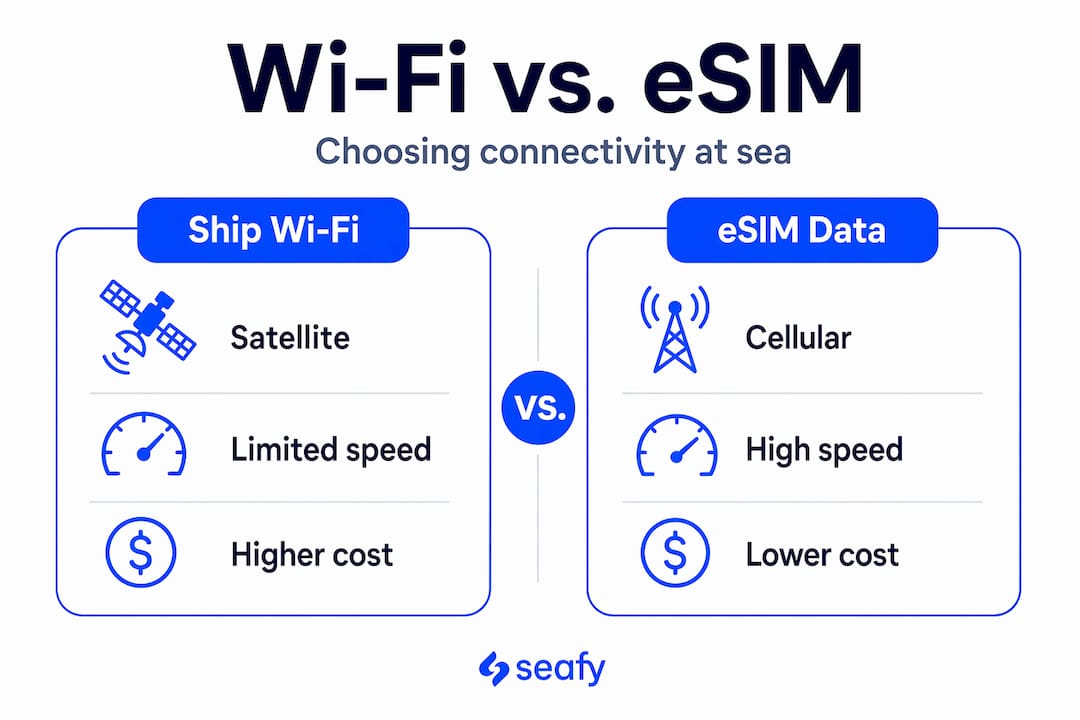
Many travelers combine eSIM for port days and ship Wi-Fi for sea days, saving 70 to 80% on connectivity costs over a 14-day cruise. That is a meaningful saving that most people miss because they default to buying a full-voyage package at the start.
Smart planning looks like this:
- Activate your eSIM before departure and confirm it works in all countries on your itinerary
- Purchase ship Wi-Fi only for confirmed sea days on your schedule
- Use port time for bandwidth-heavy tasks: uploading photos, video calls, large downloads
- Reserve ship Wi-Fi for messaging, light browsing, and essential communications
Explore your onboard Wi-Fi vs eSIM options in detail before your voyage to match the right tool to each leg of your trip.
Best practices for maintaining a reliable Wi-Fi connection and security onboard
Next, let’s focus on practical tips you can apply to make your onboard Wi-Fi connection as reliable and secure as possible.
Public Wi-Fi on ships carries the same security risks as any shared network in a hotel or airport. Using a VPN on public ship Wi-Fi encrypts your traffic and prevents attacks from rogue hotspots, which are more common on high-density vessels like ferries than most travelers realize.
Follow these steps to get the most from your onboard connection:
- Install a VPN before you board. Free options exist, but a paid service offers faster speeds and stronger encryption, which matters on already-limited satellite bandwidth.
- Disable automatic updates on all your devices. A single iPhone software update can consume several gigabytes, eating through your daily data allowance in minutes.
- Close background apps. Apps like cloud storage, email sync, and social media refresh constantly. Switch them to manual sync while onboard.
- Connect during off-peak hours. Early mornings (before 7 a.m.) and late nights (after 11 p.m.) consistently deliver better speeds because fewer passengers are online.
- Position yourself near a Wi-Fi access point. Signal strength drops significantly through metal ship walls and decks. Lounges and common areas usually offer the best reception.
“The single most effective thing you can do for onboard Wi-Fi performance is control what your devices are doing in the background. Bandwidth on ships is shared. Every byte you save is a byte toward a faster experience.”
Use the Wi-Fi troubleshooting guide for onboard connections to diagnose issues quickly if your service drops unexpectedly.
Meeting remote work internet requirements while cruising the Mediterranean
Having reviewed security and connection tips, let’s look specifically at what remote workers must know to stay productive at sea.
Remote work places the highest demands on any internet connection. Remote workers require a minimum of 50 Mbps download and 10 Mbps upload, preferably with wired Ethernet, to avoid frozen video calls caused by Wi-Fi packet loss. Most standard ship packages do not reliably hit those numbers.
| Remote work task | Minimum speed needed | Typical ship Wi-Fi available | Realistic outcome |
|---|---|---|---|
| Email and messaging | Under 1 Mbps | Usually available | Reliable |
| Video calls (1080p) | 3 to 5 Mbps stable | Variable | Often choppy |
| File sharing (large files) | 10+ Mbps | Premium only | Slow but possible |
| Cloud-based work tools | 5 to 10 Mbps | Standard or premium | Workable with patience |
Practical realities for remote workers at sea:
- Starlink (a low-orbit satellite system offering dramatically lower latency than traditional satellites) is being adopted by some Mediterranean operators, but deployment is still limited
- Wired Ethernet ports exist on some cabins, especially in older ferry configurations
- Schedule demanding work tasks for port days when cellular or dock Wi-Fi is available
Explore how Wi-Fi supports remote work at sea to understand what is realistically achievable on different vessel types.
Pro Tip: Block your most critical work calls for port mornings before excursions. You will have full cellular connectivity and remove the risk entirely.
Rethinking the conventional wisdom on cruise and ferry Wi-Fi reliability ⚡
Here is the view we hold at Seafy after working closely with Mediterranean ferry operators: the idea that ship internet is fundamentally broken for serious use is no longer accurate. It is contextually limited, and that is a very different thing.
Starlink provides 150 to 300 Mbps downlink with 50 ms latency at sea, transforming connectivity but also requiring new user habits to fully benefit. That speed rivals good home broadband. When deployed on a ferry, it changes what is possible onboard.
The conventional wisdom said: “Ship Wi-Fi is a last resort.” The smarter framing is: “Ship Wi-Fi is a specialized tool that rewards travelers who know how to use it.”
That means choosing the right package tier, timing your usage, combining it with eSIM where appropriate, and protecting yourself with a VPN. Travelers who treat onboard internet like they treat hotel Wi-Fi, defaulting to it for everything without adjustment, will always be disappointed. Those who plan around its characteristics will stay connected, productive, and even entertained throughout their crossing.
The next wave of best onboard Wi-Fi solutions for 2026 is closing the gap significantly. Staying informed puts you ahead of the frustration.
How Seafy makes reliable Wi-Fi simple for Mediterranean ferry and cruise travelers
To help you apply these insights and stay reliably connected at sea, here is how Seafy can simplify your onboard Wi-Fi experience.
Seafy is built specifically for travelers and crew on Mediterranean routes. Through partnerships with major ferry lines including Corsica Ferries, Grimaldi Lines, and GNV, Seafy delivers onboard internet packages you can purchase and activate directly through an easy portal while you are already aboard.

Whether you need basic messaging coverage for a night crossing or a premium package for a week of remote work, Seafy’s tiered plans are designed to match your actual usage, not just sell you the most expensive option. The platform integrates with advanced satellite technology, including Starlink where available, to deliver the most stable connection possible for each route. Browse Seafy’s Wi-Fi packages before your next Mediterranean voyage and board with a plan that works for you. 🌐
Frequently asked questions
Is onboard Wi-Fi on Mediterranean cruises good enough for video calls?
Onboard Wi-Fi via satellite usually supports browsing and messaging well, but is often unreliable for smooth video calls due to variable speeds and latency. MSC Cruises confirms their satellite internet is suited for browsing and messaging but unreliable for video calls and streaming.
Can I use mobile data instead of ship Wi-Fi during my cruise?
You can use eSIM mobile data effectively in port areas, but at sea you will need ship Wi-Fi since cellular coverage is unavailable far from shore. Most travelers combine eSIM for port days with ship Wi-Fi on sea days to optimize connectivity and reduce costs.
What internet speed do I need to work remotely from a cruise ship?
Remote work requires a minimum of 50 Mbps download and 10 Mbps upload speeds, with wired Ethernet preferred for reliability. Remote work guidance recommends these thresholds specifically to prevent frozen or dropped video calls.
How can I stay secure when using public ship Wi-Fi?
Use a personal VPN to encrypt your traffic and protect your data from attackers who may create fake hotspots on high-density vessels. A VPN on ship Wi-Fi encrypts your connection and prevents packet capturing from rogue hotspots common on ferries.
Are there any tips to improve Wi-Fi performance on Mediterranean cruises?
Connect during off-peak hours like early mornings or late nights, disable auto-updates, and avoid video-heavy apps on basic packages to improve speeds noticeably. Testing speeds during low-usage hours and avoiding video apps on basic plans are consistently cited as the most effective performance strategies.