Tech & Wi-Fi
How to stay connected during ferry travel 🌐
Learn how to stay connected during ferry travel with practical tips and insights on ferry internet, so you never miss an important moment.
15 May 2026
How to stay connected during ferry travel 🌐
TL;DR:
- Ferry internet relies mainly on satellite technology, which varies in quality based on distance from shore and weather. Proper preparation, such as enabling airplane mode, downloading offline content, and using secure credentials, enhances connectivity and reduces costs. Despite improvements, complete reliability is unrealistic, so travelers should set expectations accordingly and adopt flexible workflows.
Few things are more frustrating than losing your internet connection right when you need to send a critical email, check in with family, or join a video call, and it happens mid-journey at sea. Whether you’re traveling for leisure across the Mediterranean or working remotely on a Grimaldi Lines crossing, staying connected during ferry travel is genuinely important. The good news is that with the right knowledge and a bit of smart preparation, you can dramatically improve your chances of staying online throughout your journey. This guide walks you through everything, from how ferry internet actually works to practical steps for connecting, troubleshooting, and choosing the best option for your needs.
Table of Contents
- Understand how ferry internet works
- What you need to get connected on board
- Step-by-step: Connecting to ferry Wi-Fi
- Troubleshooting and managing expectations at sea
- Comparing connectivity options for ferry travelers
- Our take: The honest reality of staying connected at sea
- Get seamless Wi-Fi for your next ferry journey
- Frequently asked questions
Key Takeaways
| Point | Details |
|---|---|
| Prepare devices | Update your device and activate airplane mode before boarding to avoid issues and charges. |
| Expect connection gaps | Maritime internet depends on satellites, so some travel segments may be offline. |
| Use ship Wi-Fi | Always choose ship Wi-Fi over cellular when at sea for safe, cost-effective internet access. |
| Have offline options | Download work or entertainment files so you stay productive and entertained when offline. |
Understand how ferry internet works
Now that you know what to expect, let’s examine how ferry internet actually works. Ferry internet is not the same as the Wi-Fi you get at home or in a hotel. It relies primarily on satellite technology, where a dish mounted on the ship communicates with satellites orbiting above. Near the coast, ships may also hand off part of that connection to land-based cellular towers for a stronger, faster link. The farther you sail from shore, the more completely you rely on satellites.
The key constraint is line of sight. Satellites need a clear view of the ship’s antenna to transmit data reliably. This means rough weather, steep coastlines, or even heavy cloud cover can interrupt your connection. Onboard internet via satellite with land-based tower switching near shore means connection is not always guaranteed. Understanding this before you board helps set realistic expectations and reduces frustration.
Here’s a quick look at what affects signal quality:
| Factor | Impact on connectivity |
|---|---|
| Distance from shore | More distance = weaker or no signal |
| Weather (storms, fog) | Can disrupt satellite signal significantly |
| Terrain (mountains, islands) | May block line of sight to satellites |
| Number of users onboard | More users = slower shared bandwidth |
| Satellite technology used | Advanced systems like Starlink perform better |
You can learn more about the internet importance on ferries and why modern ships invest so heavily in connectivity upgrades. The bottom line is that no provider, no matter how advanced, can promise 100% uptime at sea. What you can control is how well prepared you are before departure.
What you need to get connected on board
Understanding how ferry internet works helps, but what do you need to get connected once on board? The short answer is less than you might think, but preparation makes all the difference.
Basic requirements:
- A device with Wi-Fi capability (smartphone, tablet, or laptop)
- An updated operating system and browser (outdated software causes login issues)
- Your ship Wi-Fi access code or account credentials (purchased in advance or at the terminal)
- A secure, known password if you plan to use password-protected portals
Recommended device settings before boarding:
- Enable airplane mode to cut all cellular signals
- Turn on Wi-Fi manually after airplane mode is active
- Disable cellular data roaming in your phone settings as a backup safeguard
- Turn off automatic app updates, as they consume large amounts of bandwidth quickly
Switching your phone into airplane mode to avoid cellular roaming, then using ship Wi-Fi for data, is one of the smartest moves you can make before setting sail. It protects your wallet and ensures all your data traffic routes through the ship’s network as intended.
Pro Tip: Before your departure, download any files, documents, maps, or entertainment you might need. Apps like Google Docs, Spotify, and Netflix offer offline modes. Load them up the night before, and you’ll always have a reliable fallback if the Wi-Fi has a rough patch.
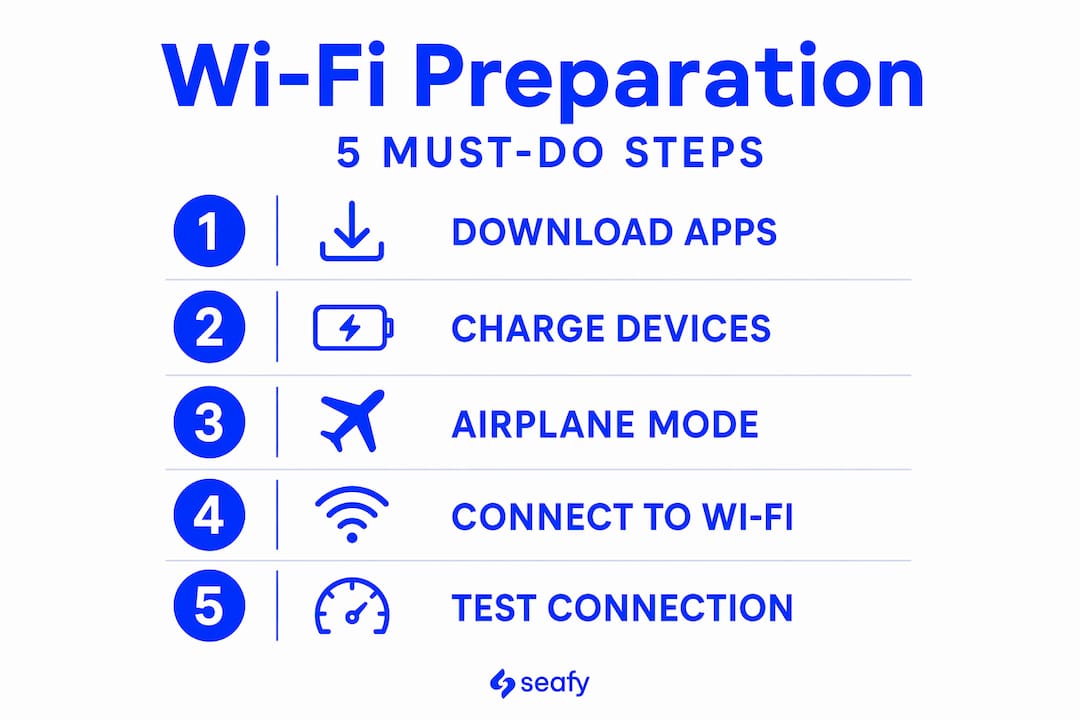
Check out this handy Wi-Fi preparation checklist and explore the different Wi-Fi solution types available on modern ferries to decide what package fits your travel style.
Step-by-step: Connecting to ferry Wi-Fi
With all requirements in place, here’s the exact process to get online during your journey. Follow these steps carefully, and you’ll be browsing within minutes of boarding. ⚡
- Enable airplane mode on your device before the ship leaves port.
- Turn on Wi-Fi manually from your device’s settings menu.
- Select the ferry’s Wi-Fi network from available networks. Look for the official ship name, not generic networks.
- Open your browser. Most ship portals use a “captive portal,” which is a login page that appears automatically when you try to visit any website.
- Enter your access code or log in to your account. If you bought a package in advance, use those credentials.
- Test your connection by loading a lightweight page like a news headline or simple search result.
“Leaving cellular active can trigger unwanted roaming charges; using airplane mode with Wi-Fi is the safest and most cost-effective approach.”
The most common mistake passengers make is forgetting to disable their mobile data before boarding. Roaming fees in international waters can be staggering, and many travelers don’t realize they’ve been charged until they return home.
Pro Tip: If the captive portal does not open automatically, try typing a simple URL like "http://google.com` (not the HTTPS version) into your browser. This forces the browser to detect the login redirect. If that still fails, switch to a different browser or try another device. The portal sometimes has compatibility issues with certain apps or system browsers.
For a deeper walkthrough, see our guide on connecting to ferry WiFi and the Wi-Fi portal steps we’ve outlined for popular routes.
Troubleshooting and managing expectations at sea
Even with all steps followed, interruptions can happen. Here’s how to minimize issues and keep expectations realistic.
Reliability depends on satellite availability; moving far from shore or facing stormy weather can mean losing connection entirely. This is normal, not a malfunction. Your first instinct might be to call for help, but there are several things to try on your own first.
Quick troubleshooting steps:
- Move to an open deck or area with fewer obstructions around you
- Restart your device completely and reconnect to the network
- Forget the network in your settings and rejoin it fresh
- Try a different device if you have one available
What’s normal vs. what needs action:
| Situation | Normal or needs action? |
|---|---|
| Brief dropout in open water | Normal, wait it out |
| Slow speeds during peak hours | Normal, use off-peak times |
| Portal not loading after restart | Try different browser first |
| Complete outage during a storm | Normal, wait for conditions to improve |
| Persistent no signal near shore | Contact ship staff |
“Set expectations that always-on internet may fail in some parts of an itinerary.”
For more targeted advice, our troubleshooting ferry Wi-Fi guide covers the most common scenarios passengers face on Mediterranean routes.
Comparing connectivity options for ferry travelers
To help you choose the most effective approach, here’s a comparison of connectivity solutions and their practical impact.
No method guarantees full connectivity at sea; all have trade-offs and require preparation. Understanding these trade-offs helps you pick the right combination for your trip.
| Option | Cost | Reliability | Best for |
|---|---|---|---|
| Ship Wi-Fi package | Moderate | Good near shore, variable at sea | Most travelers |
| Cellular roaming | High (often very high) | Depends on carrier and location | Emergency use only |
| Offline mode (preloaded content) | Free | 100% reliable | Guaranteed productivity |
| Satellite package (e.g., Starlink-enabled) | Higher | Best available at sea | Remote workers, heavy users |
Match your needs to the right option:
- Leisure travelers doing light browsing and social media: a standard ship Wi-Fi package works well
- Remote workers with calls and file sharing needs: look for Starlink-enabled routes and buy the best available package
- Travelers in high-roaming zones (international waters): always use airplane mode and rely only on ship Wi-Fi
- Anyone needing guaranteed access to files: use offline mode as your primary strategy and ship Wi-Fi as a bonus
Discover more about the impact of ferry Wi-Fi on passenger satisfaction, and review best practices for ferry internet to make the most of whatever connection you have.
Our take: The honest reality of staying connected at sea
Drawing from real travel experiences and industry lessons, here’s the unfiltered truth about online access at sea. People board ferries expecting the same seamless connectivity they have at home, and that expectation is the root cause of most frustration.
Modern ferry internet is improving, but true always-on connectivity is a myth for most itineraries. Even ships equipped with cutting-edge Starlink technology will encounter moments of reduced signal. Physics still wins in open water.
Our honest perspective is this: the travelers who have the best experience at sea are not the ones with the most expensive data plan. They’re the ones who plan intelligently, build a flexible workflow, and embrace the occasional offline moment. Flexibility is more valuable than a perfect signal.
Remote workers especially need to hear this. If your job requires you to be live on video calls for six straight hours, a ferry crossing may not be the ideal work environment on that specific day. But if you structure your tasks around what can be done offline and what requires bursts of connectivity, you’ll find ferry Wi-Fi surprisingly usable.
Pro Tip: Use offline time purposefully. Bring a reading list, write your reports or creative content in a local document, do your planning or brainstorming. Some of the best ideas come when you’re not distracted by notifications. A temporary disconnect can actually make you more productive.
We believe the ferry Wi-Fi benefits are real and growing, but only for travelers who approach connectivity with realistic expectations and smart habits. That’s the mindset we encourage across every route we support.
Get seamless Wi-Fi for your next ferry journey
If you’re planning travel and want the best chance to stay connected, here’s where to start. The advice in this guide gives you a solid foundation, but having the right platform behind you makes the biggest difference when you’re actually onboard.

Seafy is designed exactly for travelers like you, whether you’re island-hopping across the Mediterranean on Corsica Ferries or making a long crossing on GNV. Our platform makes it simple to browse packages, activate your connection before you board, and get support when you need it. We partner with leading ferry lines and integrate advanced satellite technology, including Starlink, to give you the most stable maritime internet available. Head to Seafy to explore packages for your upcoming route and set sail with confidence. Buon surf! 🌐
Frequently asked questions
Will I have internet access the entire time during ferry travel?
Internet is often available on ferries but can be interrupted in open sea, bad weather, or mountainous areas, as no full coverage is guaranteed due to satellite and terrain limitations.
How can I avoid high roaming charges while using internet on ferries?
Put your phone in airplane mode and turn on Wi-Fi only, since airplane mode with Wi-Fi avoids unwanted cellular charges while keeping you connected to the ship’s network.
What should I do if the Wi-Fi is not working on the ferry?
Try moving to an open deck, restarting your device, and reconnecting to the network, as connection issues at sea are common due to route conditions or weather and often resolve on their own.
Is satellite internet enough for remote work during travel?
Satellite internet can handle many remote work tasks like emails and document editing, but satellite connectivity is still not consistently reliable for high-bandwidth demands like HD video calls across all routes.