Tech & Wi-Fi
Plan your ferry holiday with reliable Wi-Fi connectivity
Discover how to plan your Mediterranean ferry holiday with reliable Starlink Wi-Fi. Get speeds of 50-70 Mbps for remote work, streaming, and staying connected at sea.
24 March 2026
Plan your ferry holiday with reliable Wi-Fi connectivity
Picture yourself settling into your ferry cabin, ready to catch up on work or stream your favorite show, only to find the Wi-Fi crawling at dial-up speeds or nonexistent. For travelers planning Mediterranean ferry holidays, staying connected for remote work, entertainment, and communication has become essential. Whether you’re a digital nomad balancing productivity with adventure or simply want to share your journey in real time, unreliable internet can derail your plans. This guide shows you exactly how to secure seamless Wi-Fi connectivity on your ferry trip, from choosing the right routes and packages to troubleshooting common challenges, so you can work, stream, and stay connected effortlessly throughout your voyage.
Table of Contents
- Key takeaways
- Understanding ferry Wi-Fi: technology, coverage, and speeds
- Preparing your connected ferry holiday: choosing routes, pre-booking Wi-Fi, and security tips
- Connecting onboard and troubleshooting common Wi-Fi challenges
- Maximizing your connected holiday experience: use cases, productivity, and entertainment
- Boost your ferry experience with Seafy Wi-Fi on board
- FAQ
Key Takeaways
| Point | Details |
|---|---|
| Seafy on ferries | Seafy provides Starlink powered WiFi on major Mediterranean ferries including Corsica Ferries, Grimaldi Lines, GNV, and Sardinia Ferries. |
| Speeds 50 to 70 Mbps | Speeds on board range from 50 to 70 Mbps, enabling video calls, streaming, and remote work. |
| Prebook saves 30 percent | Booking your WiFi online before departure can save up to 30 percent and ensures availability. |
| Use VPN and roaming off | Use VPN and disable mobile roaming to protect data and avoid roaming charges. |
| Plan downloads before boarding | Prioritize download heavy tasks before boarding to optimize the connectivity experience. |
Understanding ferry Wi-Fi: technology, coverage, and speeds
Mediterranean ferry Wi-Fi has evolved dramatically from the sluggish connections that once frustrated travelers. Modern systems like Seafy combine Starlink satellite technology with cellular networks to deliver consistent high-speed internet across major routes. This hybrid approach switches seamlessly between satellite coverage in open water and cellular signals when ferries approach ports, maintaining connectivity throughout your journey.
Seafy provides Starlink-powered Wi-Fi on major Mediterranean ferries including Corsica Ferries, Grimaldi Lines, GNV, and Sardinia Ferries. Ships like GNV Spirit, GNV Allegra, and the entire Corsica Ferries fleet feature comprehensive coverage in cabins and public indoor areas. The connection setup works through a simple portal requiring just one click to activate your purchased package, eliminating complex login procedures that plagued older systems.
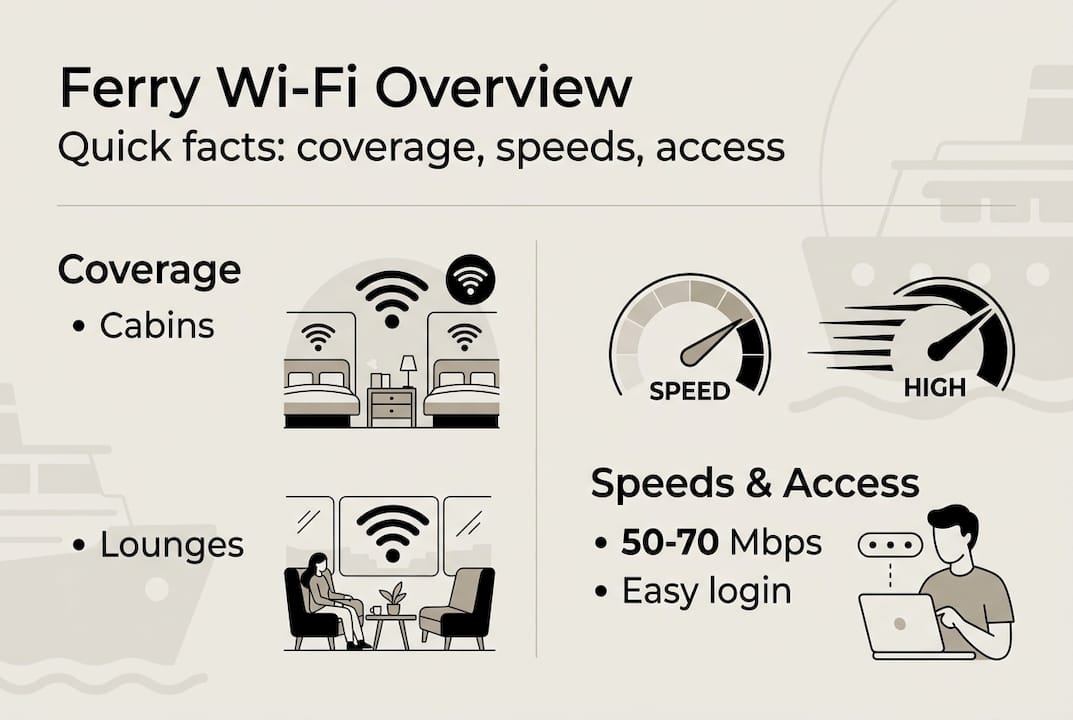
Coverage zones vary by ship design, but you’ll typically find reliable signals in cabins, lounges, restaurants, and indoor seating areas. Outdoor decks and vehicle parking areas generally have limited or no coverage due to technical constraints. Understanding these limitations helps you plan where to work or stream during your voyage.
Seafy/Starlink on Corsica Ferries delivers 50-70 Mbps consistently, sufficient for HD streaming and remote work. These speeds support multiple simultaneous activities: video conferencing, file uploads, social media browsing, and streaming services without buffering. Latency remains slightly higher than land-based connections due to satellite transmission distances, but stays under 99ms thanks to Starlink’s low Earth orbit satellites, making real-time communication feasible.
The technology behind onboard Wi-Fi solutions continues advancing, with newer installations offering even better performance. Ships equipped with Starlink represent the current gold standard for maritime connectivity, vastly outperforming older VSAT systems that many ferries still use.
With this technology background, you’ll be better equipped to choose the right Wi-Fi packages and prepare for your trip.
Preparing your connected ferry holiday: choosing routes, pre-booking Wi-Fi, and security tips
Selecting the right ferry route makes all the difference for connectivity quality. Major routes between France, Italy, Corsica, Sardinia, and Sicily now feature Seafy’s Starlink-powered Wi-Fi, offering reliable coverage throughout crossings. Popular routes include Nice to Corsica, Genoa to Barcelona, Civitavecchia to Sardinia, and Livorno to Bastia, all served by Seafy-equipped vessels.
Pre-booking Wi-Fi packages can save up to 30%; packages vary by data amount and streaming capability. Most ferry lines offer tiered options ranging from basic messaging packages with 500MB to premium unlimited streaming plans. A typical structure includes:
| Package Type | Data Allowance | Best For | Approximate Price |
|---|---|---|---|
| Basic | 500MB-1GB | Messaging, email | €5-8 |
| Standard | 2-5GB | Browsing, social media | €12-18 |
| Premium | 10GB+ | Streaming, video calls | €25-35 |
| Unlimited | No cap | Remote work, heavy streaming | €40-50 |
Booking your package online before departure guarantees availability and locks in lower prices. During peak summer months, onboard purchases may face higher demand and premium pricing. The pre-booking process takes minutes through the Seafy portal or ferry line websites, with activation codes delivered via email.
Security becomes paramount when using shared maritime Wi-Fi networks. Using VPN enhances public Wi-Fi security; disable mobile roaming to avoid surprise charges. Your phone may automatically connect to cellular networks at ports or near coastlines, triggering expensive international roaming fees. Switching to airplane mode with Wi-Fi enabled prevents these charges while maintaining internet access.
Essential security practices include:
- Enable two-factor authentication on critical accounts before boarding
- Use a reputable VPN service to encrypt your connection
- Avoid accessing banking or sensitive accounts on public networks
- Update devices and security software before your trip
- Create strong, unique passwords for the ferry Wi-Fi portal
Pro Tip: Download entertainment content, work files, and offline maps before boarding. While ferry Wi-Fi handles streaming well, pre-loading content conserves your data allowance and provides backup entertainment if connectivity drops during weather events.
Prepare a digital checklist covering communication apps, cloud storage access, and entertainment subscriptions. Verify that your VPN works with video conferencing tools if you plan remote work calls. Test your setup at home to troubleshoot compatibility issues before departure.
Having prepared your trip with the right route and Wi-Fi, let’s review how to connect smoothly onboard and troubleshoot common issues.
Connecting onboard and troubleshooting common Wi-Fi challenges
Accessing Seafy Wi-Fi onboard Mediterranean ferries follows a straightforward process designed for immediate connectivity. Once you board and settle into your cabin or public area, follow these steps:
- Connect your device to the ship’s Wi-Fi network (usually named “Seafy” or the ferry line name)
- Open your browser, which automatically redirects to the Seafy portal
- Enter your pre-purchased activation code or select a package to buy onboard
- Accept terms and conditions
- Click activate and wait 10-30 seconds for connection confirmation
- Begin browsing, streaming, or working immediately
Seafy portal allows one-click activation and progress between satellite and cellular connection near shore. The system intelligently switches between Starlink satellite coverage in open water and cellular networks as ships approach ports, maintaining your session without requiring reconnection. You’ll notice brief interruptions during handoffs, typically lasting 5-10 seconds.
Common connectivity challenges include weather-related disruptions, latency variations, and bandwidth reduction during peak usage hours. Heavy storms can temporarily degrade satellite signals, though Starlink’s resilience minimizes these impacts compared to older systems. Latency fluctuates between 50-99ms depending on satellite positioning and ship location, occasionally affecting real-time gaming or video calls.
Peak usage occurs during evening hours when passengers stream entertainment simultaneously. Bandwidth management systems ensure fair distribution, but you may experience slower speeds between 8-11 PM. Planning bandwidth-intensive tasks for morning or afternoon hours optimizes performance.
| Ferry Line | Technology | Typical Speed | Coverage Quality |
|---|---|---|---|
| Corsica Ferries (Seafy) | Starlink | 50-70 Mbps | Excellent |
| GNV (Seafy) | Starlink | 50-70 Mbps | Excellent |
| Grimaldi Lines (Seafy) | Starlink | 50-70 Mbps | Excellent |
| La Méridionale | Legacy VSAT | 3-8 Mbps | Fair |
| Other operators | Varies | 1-15 Mbps | Poor to Fair |
Troubleshooting tips for common issues:
If your connection drops, first check that airplane mode is enabled with Wi-Fi turned on separately. This prevents your device from seeking cellular networks. Clear your browser cache and cookies, then reconnect to the Seafy network. For persistent problems, forget the network in your device settings and rejoin from scratch.
Slow speeds during your session may indicate data cap approaching. Check your package usage through the Seafy portal dashboard. If you’ve consumed your allowance, upgrade to a larger package rather than purchasing a new one, which costs more.
Pro Tip: Position yourself in central indoor areas for strongest signal strength. Cabins near the ship’s center typically receive better coverage than those at bow or stern extremes. Metal bulkheads and ship infrastructure can create dead zones in corner cabins.
Video call quality issues often stem from latency rather than bandwidth. Use audio-only mode when video freezes, or switch to messaging apps for critical communications. Wi-Fi troubleshooting steps provide detailed solutions for specific scenarios.
Once connected confidently, you can enjoy fully your connected ferry experience, combining work and leisure seamlessly.
Maximizing your connected holiday experience: use cases, productivity, and entertainment
Reliable Starlink Wi-Fi transforms Mediterranean ferry crossings from disconnected downtime into productive work sessions or entertainment-rich leisure time. Remote workers leverage the connectivity for video conferences, collaborative document editing, cloud storage access, and project management tasks that previously required postponing until reaching land.
Seafy Wi-Fi enables a 30% productivity boost for remote workers onboard Mediterranean ferries. This improvement stems from uninterrupted access to work tools, reduced stress about connectivity gaps, and the ability to maintain normal workflows during travel days. Digital nomads particularly value this capability, turning 8-12 hour crossings into billable work time rather than lost productivity.
Practical work activities supported by ferry Wi-Fi include:
- HD video calls with clients, colleagues, or family
- Real-time collaborative editing in Google Workspace or Microsoft 365
- Large file uploads and downloads through cloud services
- Customer support and communication via email and messaging
- Research, writing, and content creation tasks
- Software development and code repository access
Entertainment options expand dramatically with high-speed connectivity. Passengers stream Netflix, YouTube, Spotify, and other services in HD quality without buffering. Social media sharing happens in real time, letting you post sunset photos from the deck or update travel blogs as experiences unfold. Online gaming becomes feasible for turn-based or strategy games, though fast-paced competitive gaming may struggle with latency.
Over 70% of passengers prioritize Wi-Fi; post-upgrade satisfaction dramatically improves. Ferry lines report that connectivity quality ranks second only to cabin comfort in passenger satisfaction surveys. Families appreciate keeping children entertained during long crossings, while business travelers value maintaining productivity without sacrificing travel time.
“The Wi-Fi quality on Seafy-equipped ferries completely changed my approach to Mediterranean travel. I can now schedule client calls during crossings, turning what used to be dead time into productive work sessions. The 60 Mbps speeds rival my home office connection.” — Remote work consultant, frequent Corsica Ferries passenger
Balancing connectivity use optimizes battery life and data consumption throughout your voyage. Enable low power mode on devices during extended work sessions. Download large files or updates while charging rather than draining battery. Close background apps consuming data unnecessarily, particularly auto-playing video feeds and cloud backup services.
Post-pandemic trends show increasing numbers of digital nomads incorporating ferry travel into work routines. The combination of reliable Wi-Fi, comfortable workspaces in ferry lounges, and scenic travel experiences appeals to remote workers seeking alternatives to flights or trains. Mediterranean routes particularly attract this demographic during shoulder seasons when pricing drops and ships are less crowded.
The importance of ferry internet extends beyond individual convenience to broader travel industry transformation. Connected ferries enable new business models, improve safety communications, and enhance the overall maritime travel experience for modern passengers who expect connectivity as a baseline service.
With a clear idea of what a connected ferry holiday can offer, let’s explore how you can seamlessly integrate this connectivity with Seafy’s offerings.
Boost your ferry experience with Seafy Wi-Fi on board
Seafy delivers the Mediterranean’s most reliable maritime Wi-Fi through partnerships with major ferry lines including Corsica Ferries, Grimaldi Lines, GNV, and Sardinia Ferries. The platform simplifies connectivity with an intuitive portal for pre-booking packages and one-click activation onboard, eliminating the frustration of complex login procedures or unreliable service that plagued older ferry internet systems.

Travelers and remote workers consistently rate Seafy Wi-Fi on board as the gold standard for maritime connectivity, praising the consistent 50-70 Mbps speeds that support everything from HD video streaming to professional video conferences. The service covers all major Mediterranean routes, ensuring you stay connected whether crossing from Nice to Corsica, Genoa to Barcelona, or Civitavecchia to Sardinia.
Pro Tip: Book your Wi-Fi package at least 48 hours before departure to secure early booking discounts of up to 30% and guarantee availability during peak summer travel periods when onboard purchases may face higher demand and premium pricing.
FAQ
Is ferry Wi-Fi reliable enough for video calls and remote work?
Seafy/Starlink delivers 50-70 Mbps, suitable for HD video calls and remote work. This performance supports Zoom, Microsoft Teams, and Google Meet conferences with multiple participants, along with simultaneous file sharing and cloud application access. Latency stays under 99ms due to Starlink’s low Earth orbit satellites, making real-time collaboration feasible though slightly less responsive than land-based connections.
How can I get the best Wi-Fi deal for my ferry trip?
Pre-book Wi-Fi packages up to 30% cheaper than onboard purchase. Access the Seafy portal or your ferry line’s website to compare package tiers based on your usage needs, from basic messaging plans with 500MB to unlimited streaming options. Booking 48-72 hours before departure guarantees availability and locks in promotional pricing that increases closer to sailing dates.
Are there any Wi-Fi coverage limitations I should expect on ferries?
Wi-Fi coverage generally excludes outdoor decks and parking areas. Reliable signals reach cabins, lounges, restaurants, and indoor seating areas, but technical constraints limit outdoor and vehicle deck coverage. Weather conditions and peak usage periods may temporarily impact speed and availability, though Starlink’s resilience minimizes these disruptions compared to older satellite systems.
What security measures should I take when using ferry Wi-Fi?
Enable a VPN before connecting to encrypt your data and protect sensitive information on the shared network. Disable mobile roaming completely by switching to airplane mode with Wi-Fi enabled separately, preventing expensive international charges when ships approach ports. Activate two-factor authentication on critical accounts and avoid accessing banking services unless absolutely necessary.
Can I stream entertainment and work simultaneously on ferry Wi-Fi?
The 50-70 Mbps speeds on Seafy-equipped ferries support multiple simultaneous activities across several devices. A typical premium package handles HD streaming on one device while another runs video calls or uploads files. Monitor your data consumption through the portal dashboard to avoid exceeding package limits, and consider upgrading to unlimited plans for heavy multi-device usage during longer crossings.