Tech & Wi-Fi
How to secure your internet access on ships: step-by-step
Learn how to connect safely to ship Wi-Fi with this step-by-step guide covering VPNs, network verification, troubleshooting, and Mediterranean ferry vs cruise tips.
07 April 2026
How to secure your internet access on ships: step-by-step
TL;DR:
- Secure ship Wi-Fi requires verifying the official network and using a VPN before connecting.
- Human error and port-based rogue networks pose significant security risks at sea.
- Layered protections like VPN, strong passwords, and disconnecting during port stops enhance safety.
Logging into an unfamiliar ship Wi-Fi network feels like a gamble. Will your data stay private? Will the connection hold up for a video call or a quick check of your email? These are real concerns, not paranoia. Public maritime networks carry genuine security risks, from rogue access points near ports to overcrowded bandwidth during peak hours. This guide walks you through exactly what to prepare before boarding, how to connect safely once on board, how to troubleshoot common issues, and how to verify you are protected throughout your Mediterranean voyage, whether you are traveling for leisure or working remotely from the sea. 🌐
Table of Contents
- What you need for secure internet on board
- Step-by-step: Connect safely to ship Wi-Fi
- Troubleshooting and avoiding common mistakes
- Special focus: Mediterranean ferries vs. cruise ships
- Our take: The reality of ‘secure’ internet at sea
- Stay connected and secure with trusted ship Wi-Fi solutions
- Frequently asked questions
Key Takeaways
| Point | Details |
|---|---|
| Prepare your devices | Always update devices and set secure passwords before connecting to shipboard networks. |
| Use a VPN | VPNs are essential to encrypt your data and maintain privacy while using maritime Wi-Fi. |
| Check the connection | Only connect to verified ship Wi-Fi names and ask crew if uncertain, especially near port. |
| Troubleshoot wisely | Expect variability; use troubleshooting steps for slow or unreliable internet during your journey. |
| Adapt for ferry or cruise | Recognize that security approaches differ—ferries have more port risks while cruises offer longer, steadier access. |
What you need for secure internet on board
Now that you know the journey ahead, let’s start with the essentials needed before you ever connect.
Modern ships use two main technologies to deliver internet at sea. The most capable is satellite connectivity, with low-earth orbit (LEO) systems like Starlink delivering 25 to 220 Mbps download speeds and 5 to 20 Mbps upload. Many Mediterranean routes also use hybrid systems that combine satellite with coastal 5G, giving you stronger, more stable coverage when sailing close to shore. Understanding this matters because your plan choice and security setup should match the technology available on your vessel. You can read more about maritime Wi-Fi essentials to get a clearer picture before you sail.
Devices and tools to bring:
- A laptop, tablet, or smartphone with the latest operating system updates installed
- A paid VPN subscription (choose one with a kill switch feature)
- A two-factor authentication (2FA) app such as Google Authenticator or Authy
- Strong, unique passwords stored in a password manager
- A list of the official ship Wi-Fi network names (get these from your booking confirmation)
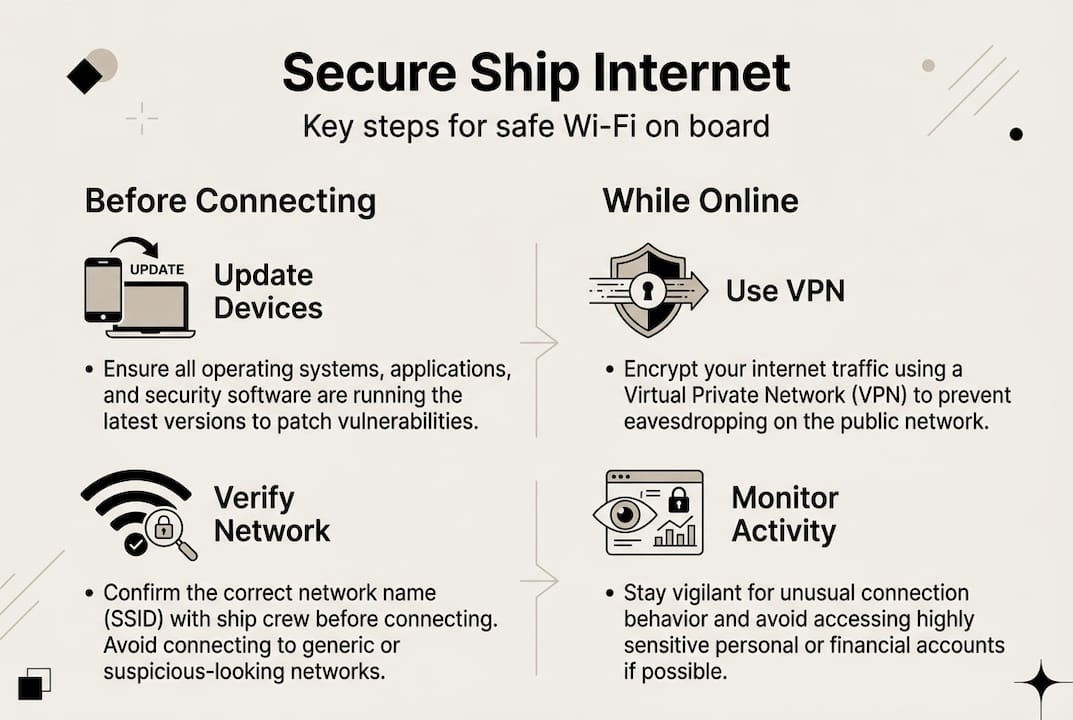
Knowing how to recognize the official ship network is critical. Ships typically display the network name (SSID) in the welcome portal or on printed cards in your cabin. If you are unsure, ask a crew member before connecting. Rogue networks, which are fake hotspots designed to steal your data, often mimic official names with small spelling variations.
| Feature | Satellite (LEO/Starlink) | Hybrid Satellite + 5G |
|---|---|---|
| Download speed | 25 to 220 Mbps | 50 to 300 Mbps near coast |
| Upload speed | 5 to 20 Mbps | 10 to 50 Mbps near coast |
| Latency | Low (20 to 60 ms) | Very low near shore |
| Best for | Open sea | Mediterranean coastal routes |
| VPN compatibility | Usually yes (premium plans) | Usually yes |
For a deeper look at how these systems work in practice, check out reliable internet at sea and review the core internet security practices that apply specifically to maritime travel.
Pro Tip: Create a travel-only email address and temporary accounts for onboard use. This isolates your sensitive personal and work data from any exposure that might happen on a shared network.
Step-by-step: Connect safely to ship Wi-Fi
With your tools and knowledge in hand, here’s the safest way to get connected, step by step.
- Confirm the official network name. Before touching your Wi-Fi settings, verify official network names with a crew member. This is especially important near ports, where rogue access points are more common.
- Enable your VPN first. VPNs encrypt your traffic by creating a secure tunnel between your device and the internet. Activate it before you connect to the ship’s network, not after.
- Open your device’s Wi-Fi settings and select the confirmed network. Do not connect to any network that is not on your verified list.
- Open a browser to reach the ship’s login portal. Enter your credentials carefully. Use your password manager to avoid typing errors.
- Verify the portal uses HTTPS. Look for the padlock icon in your browser bar. If it is missing, do not proceed.
- Avoid sensitive accounts. Do not log into banking, government, or healthcare portals over ship Wi-Fi, even with a VPN active.
For a more detailed walkthrough, the secure maritime internet steps guide covers edge cases and advanced configurations. You can also explore secure communication onboard for messaging and email best practices.
⚠️ Security warning: Never log into banking, government, or financial accounts over public ship Wi-Fi. Even HTTPS encryption is not sufficient protection on a shared network without a VPN. The risk is real and avoidable.
HTTPS protects data in transit between your browser and a website, but it does not hide your activity from others on the same local network. A VPN adds a second layer that covers this gap. Think of HTTPS as a locked mailbox and the VPN as an armored truck carrying that mailbox.
Pro Tip: If you are docking at a port and feel uncertain about the network, ask a staff member directly. Port areas attract more rogue networks than open water, and a 30-second conversation with crew can save you a lot of trouble.
Troubleshooting and avoiding common mistakes
Even with careful setup, problems can arise. Here’s how to handle the most common ones.

Slow speeds are the most frequent complaint on ship Wi-Fi. The usual causes are network congestion during peak hours (typically after dinner and early morning), adverse weather affecting satellite signal, and plan-level restrictions that cap your bandwidth. Basic plans on most cruise lines do not support VPN traffic, so if your VPN fails to connect, you may need to upgrade to a premium tier.
Troubleshooting steps if your connection fails or slows:
- Disconnect and reconnect to the official network
- Toggle airplane mode on and off to reset your device’s network stack
- Restart your browser and clear cached data
- Switch from a 5 GHz band to a 2.4 GHz band if your device allows it (2.4 GHz travels farther through ship walls)
- Contact crew or check the ship’s app for network announcements
- If your VPN drops, pause all sensitive activity until it reconnects
Weather is a factor that many travelers underestimate. Storms affect Starlink performance, and peak hours can slow speeds significantly. Plan your most data-intensive tasks, like video calls or large file uploads, for off-peak windows such as mid-morning or early afternoon.
| Plan type | Typical download speed | VPN support | Best use case |
|---|---|---|---|
| Basic | 2 to 10 Mbps | Often blocked | Social media, messaging |
| Standard | 10 to 50 Mbps | Sometimes | Streaming, light work |
| Premium (Starlink) | 52 to 135 Mbps | Yes | Remote work, video calls |
For more specific guidance, the Wi-Fi troubleshooting onboard guide covers device-specific fixes and plan upgrade paths. You can also check Wi-Fi speed benchmarks from real-world cruise tests to set realistic expectations.
Pro Tip: Switch to airplane mode when docking at port. This prevents your phone from automatically connecting to unknown cellular or Wi-Fi networks and avoids surprise roaming charges.
Special focus: Mediterranean ferries vs. cruise ships
Your security approach changes depending on your vessel. Let’s look at how ferries and cruise ships compare.
Ferry crossings are typically shorter, ranging from a few hours to overnight, while cruise voyages can last days or weeks. This difference in duration changes your risk profile. On a short ferry crossing, you have less time to expose sensitive data, but you also have less time to troubleshoot if something goes wrong. Cruise ships offer more infrastructure and dedicated IT support, but longer exposure means more opportunities for security lapses.
The hybrid satellite and 5G coverage on Mediterranean routes reaches 80 to 90% near coastlines. Seafy partners with Corsica Ferries, Grimaldi Lines, and other major operators to deliver this coverage consistently across popular routes.
| Factor | Mediterranean ferries | Cruise ships |
|---|---|---|
| Trip duration | Hours to overnight | Days to weeks |
| Port risk exposure | High (frequent stops) | Moderate (fewer ports) |
| Typical speed | 10 to 100 Mbps | 25 to 220 Mbps |
| IT support onboard | Limited | Dedicated team |
| VPN compatibility | Varies by operator | Usually on premium plans |
For a broader comparison of connectivity options, cruise vs ferry Wi-Fi offers useful context on what to expect from each vessel type.
Checklist for ferry passengers:
- Confirm the official Wi-Fi network name at the ticket desk or from crew before boarding
- Activate your VPN immediately after connecting
- Avoid logging into sensitive accounts during port stops
- Disconnect from Wi-Fi before the ferry docks to reduce rogue network exposure
- Reconnect only after the vessel has departed and you have re-verified the network
The Wi-Fi impact on ferry travel guide goes deeper on how connectivity shapes the overall passenger experience on shorter routes. ⚡
Our take: The reality of ‘secure’ internet at sea
Here is something most guides will not say plainly: there is no such thing as a perfectly secure connection at sea. Or anywhere, for that matter. Security is a spectrum, not a switch you flip.
After working closely with passengers and ferry operators across the Mediterranean, we have seen that the biggest threats are not sophisticated hacking attempts. They are basic mistakes: connecting to the wrong network, skipping the VPN, or logging into a bank account because it feels quick and harmless. Human error is the most common vulnerability.
Layered protection works better than any single tool. A VPN, strong credentials, 2FA, and network verification together create a defense that is genuinely hard to breach. No single app or firewall replaces that combination.
The uncomfortable truth is that sometimes the safest move is to go offline entirely. During port stops, before major financial transactions, or when your VPN is behaving unpredictably, disconnecting is not a failure. It is the right call. The importance of seamless internet is real, but so is knowing when to pause. Trust your instincts, follow the steps, and stay in control of your digital experience at sea.
Stay connected and secure with trusted ship Wi-Fi solutions
Ready to put these security practices to use? Seafy makes it straightforward to connect safely on the Mediterranean routes you care about most.

Through partnerships with Corsica Ferries, Grimaldi Lines, GNV, and other major operators, Seafy offers Wi-Fi on board packages designed for both leisure travelers and remote workers. Premium plans are VPN-ready, optimized for video calls and cloud apps, and backed by Starlink satellite technology for stable open-sea performance. Whether you are crossing the Tyrrhenian for a weekend or working remotely on a week-long cruise, Seafy’s portal makes purchasing and activating your plan simple. Explore the available packages and guides to find the right fit for your voyage. 🌐
Frequently asked questions
What is the safest way to use ship Wi-Fi?
Activate a VPN before connecting and only join the official ship network after confirming its name with crew. The core best practices also include enabling 2FA, using strong unique passwords, and avoiding sensitive accounts on public networks.
Is ship Wi-Fi fast enough for remote work?
Premium plans on modern cruise ships with Starlink typically deliver 52 to 135 Mbps download speeds, which supports video calls and cloud apps well, though speeds may drop during peak hours or bad weather.
Why do security risks increase near ports?
Ports attract rogue networks designed to mimic official ship SSIDs. Always verify the network name with crew before connecting and disconnect when docking to reduce exposure.
What should I do if my ship’s Wi-Fi suddenly stops working?
Toggle airplane mode, restart your device, and try reconnecting to the verified network. Storms affect Starlink performance and peak-hour congestion are the most common culprits, so contact crew if the issue persists.