Tech & Wi-Fi
How Wi-Fi congestion affects your cruise experience
Discover what is cruise ship wifi congestion and how it impacts your connectivity at sea. Get tips to enhance your internet experience onboard!
26 April 2026
How Wi-Fi congestion affects your cruise experience
TL;DR:
- Wi-Fi congestion occurs when too many devices share limited satellite bandwidth at sea.
- Peak hours and high-bandwidth activities significantly reduce onboard internet speeds.
- Using off-peak times, optimizing device habits, and near access points improve connectivity.
You step on board, connect to the ship’s Wi-Fi, and see a reassuring signal bar. Then, somewhere between the buffet and the pool deck, your video call freezes mid-sentence. Sound familiar? Cruise lines advertise fast, seamless internet, yet many passengers and crew find the reality far more frustrating. Wi-Fi congestion at sea is one of the most common complaints onboard, and it’s also one of the least explained. This guide breaks down exactly what’s happening to your signal, why it matters, and what you can do about it. 🌐
Table of Contents
- What does Wi-Fi congestion mean on cruise ships?
- How does congestion impact your onboard internet experience?
- What causes Wi-Fi congestion on cruise ships?
- Smart strategies to beat Wi-Fi congestion at sea
- Why cruise ship Wi-Fi congestion is improving, but not fixed — our take
- Discover better Wi-Fi options at sea with Seafy
- Frequently asked questions
Key Takeaways
| Point | Details |
|---|---|
| Congestion explained | Wi-Fi congestion happens when too many users share limited bandwidth, causing slow speeds onboard. |
| Peak times impact | Internet speeds drop dramatically during busy hours, affecting streaming, video calls, and uploads. |
| User strategies | Schedule online activity for off-peak times and limit high-bandwidth apps for the best cruise ship connection. |
| Upgrades help but not perfect | Even with newer satellites like Starlink, reliable Internet still requires patience and smart usage habits. |
What does Wi-Fi congestion mean on cruise ships?
Understanding Wi-Fi congestion starts with a simple analogy. Imagine a highway that can handle 1,000 cars per hour. If 3,000 cars try to use it at the same time, everything slows to a crawl. That’s congestion. The same principle applies to your onboard internet.
Wi-Fi congestion happens when more users and devices try to access a network than the available bandwidth can support. Bandwidth, simply put, is the maximum amount of data that can travel through a connection at once. When too many people stream, browse, or video call simultaneously, each person gets a smaller slice of that bandwidth, and speeds drop for everyone.
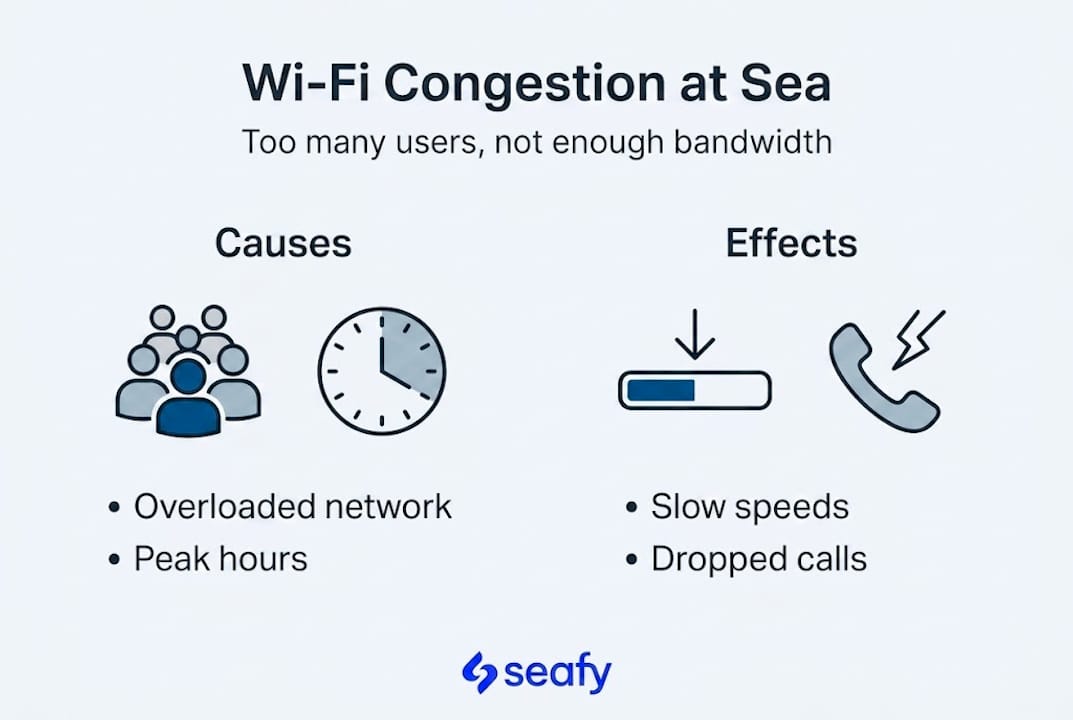
On a cruise ship, how cruise Wi-Fi works is fundamentally different from your home network. At home, you might share your connection with four people. On a large cruise ship, you’re sharing satellite capacity with thousands of passengers and crew. The ship relays all that traffic through satellites orbiting high above the Earth, which introduces additional delays and capacity limits that simply don’t exist on land-based connections.
Recent performance data illustrates just how dramatic these swings can be. Starlink cruise speeds recorded by Ookla in the first half of 2025 show median download speeds of 80 to 200 Mbps on cruise ships. But here’s the catch: at the 10th percentile, meaning during the worst 10% of measured sessions, download speeds fall to just 21 Mbps, and upload speeds drop to a painful 1.74 Mbps. On specific ships like the Virgin Resilient Lady, real-world tests recorded download speeds as low as 2 to 14 Mbps.
Key takeaway: Even if your ship uses cutting-edge satellite technology, congestion can reduce your speeds to a fraction of what’s advertised.
Signs you’re experiencing Wi-Fi congestion onboard include:
- Web pages taking 10 or more seconds to load
- Video calls that freeze, pixelate, or disconnect
- Messaging apps where messages take minutes to deliver
- Streaming services that constantly buffer or drop quality
- File uploads that stall or fail entirely
Recognizing these signs early helps you adapt your behavior rather than simply blaming the ship’s internet as broken.
How does congestion impact your onboard internet experience?
Now that you know what congestion is, let’s look at its tangible consequences for your digital life at sea.
The gap between peak performance and congested performance is startling. According to Holland America Zuiderdam Wi-Fi performance benchmarks, the Zuiderdam recorded download speeds ranging from 52 to 135 Mbps during favorable conditions. That’s a wide range already, but compare it to the sub-20 Mbps reality during peak congestion periods and you start to see the problem. Upload speeds collapsing to under 2 Mbps make tasks like sending photos, joining a video meeting, or uploading work files nearly impossible.
Here’s a quick breakdown of how common onboard tasks are affected at different speed levels:
| Task | Minimum speed needed | Experience during congestion |
|---|---|---|
| Browsing and email | 1-5 Mbps | Usually functional |
| Video calls (SD quality) | 5-10 Mbps | Choppy or unstable |
| Streaming HD video | 10-25 Mbps | Frequent buffering |
| Large file uploads | 10+ Mbps upload | May stall or fail |
| Cloud backups | 5+ Mbps upload | Very slow or interrupted |
The practical reality is that light tasks like checking email or browsing news sites remain manageable even during moderate congestion. But anything requiring consistent upload or download performance becomes unreliable fast.
The factors that impact Wi-Fi speed at sea include the time of day, your location on the ship, and the number of active users. Speeds typically crash in the morning after breakfast, again in the evenings when passengers return to their cabins, and especially on full at-sea days when no one is distracted by ports.
Pro Tip: If you need a stable connection for a work call or a large upload, aim for the 2 AM to 6 AM window. You’ll be sharing the satellite link with far fewer users, and speeds can be dramatically better.
What causes Wi-Fi congestion on cruise ships?
Having seen the effects of congestion, let’s demystify why it happens so frequently on cruise vessels.
The root causes are a mix of technical limits and human behavior patterns. Here are the main culprits:
-
Shared bandwidth: Every passenger and crew member taps into the same satellite link. As the Royal Caribbean Wi-Fi Guide notes, even ships with high-capacity 10 Gbps gateway setups still deliver just 10 to 100 Mbps per user due to how that capacity is divided. More users means less for each person.
-
Peak usage hours: The morning rush, evening wind-down, and full sea days create predictable surges. When 3,000 passengers all try to post their sunset photos at 7 PM, the network buckles.
-
Bandwidth-heavy applications: Streaming services like Netflix or Spotify, automatic cloud backups from phones and laptops, and video conferencing platforms consume enormous amounts of data. One user streaming 4K video can use more bandwidth than 20 users simply browsing the web.
-
VPN usage: Many passengers and remote workers use VPNs (Virtual Private Networks) to access content from home or protect their connection. VPNs add extra data overhead to every request, which makes congestion worse for everyone around them.
-
Satellite latency: Even the best satellite connections introduce a small delay, called latency, because signals must travel to space and back. Starlink’s low-earth-orbit satellites have reduced this dramatically, but during congested periods, latency spikes can still make real-time apps sluggish.
The good news? Improvements in Wi-Fi solutions for congestion are real and ongoing. Starlink and other advanced satellite systems have genuinely raised the floor for onboard internet quality. But technology alone can’t fully solve the behavior-driven demand problem.
Pro Tip: Turn off automatic app updates and disable cloud photo backups before boarding. These background processes chew through data silently and contribute to network congestion even when your phone sits in your pocket.
Smart strategies to beat Wi-Fi congestion at sea
Understanding the root causes, you can now focus on what actions help minimize congestion’s impact.
The good news is that several simple adjustments can make a significant difference to your daily onboard experience. These strategies work whether you’re a passenger trying to stay in touch with family or a crew member completing work tasks during a break.
- Go online in off-peak hours. As noted in Royal Caribbean’s Wi-Fi guidance, peak-hour unreliability is one of the most consistent complaints from passengers. Late at night or very early morning offers the clearest channels.
- Disable background data hogs. Turn off automatic iCloud or Google Photos backups, pause software updates, and close apps running in the background. These are silent bandwidth thieves.
- Use the right app for the right time. Save video calls and streaming for off-peak hours. During busy periods, stick to messaging and email, which work well even at low speeds.
- Move closer to Wi-Fi access points. Ships install access points throughout common areas. Sitting near one, rather than in a corner cabin or deep interior space, improves your individual signal strength and connection quality.
- Review your Wi-Fi package options. Some onboard packages prioritize certain types of traffic. Checking essential onboard internet tips before you sail helps you choose the right plan for your needs.
- Understand satellite coverage windows. The role of satellite internet at sea means signal quality can vary by geographic region and satellite handoff timing. Knowing this helps manage expectations.
These habits won’t eliminate congestion, but they will put you in the best possible position to use what bandwidth is available efficiently. ⚡
Why cruise ship Wi-Fi congestion is improving, but not fixed — our take
There’s a lot of enthusiasm right now about Starlink on cruise ships, and honestly, it’s justified. Median speeds have improved meaningfully, and the worst-case experiences from just a few years ago are becoming less common. But we want to be candid about something that often gets glossed over in marketing materials.
The Royal Caribbean Wi-Fi Guide makes this clear: even with 10 Gbps hardware on board, per-user speeds during peak hours still collapse because shared networks are, by their nature, competitive resources. Technology raises the ceiling, but it doesn’t eliminate the problem of too many users chasing too little capacity.
We’ve seen passengers arrive on board expecting fiber-level internet and feel genuinely let down during busy evenings. The real issue is a gap between promise and expectation, not just technology. Adapting your habits, understanding the impacts on cruise Wi-Fi speeds, and timing your usage smartly remains just as important as whatever satellite upgrade the ship is running. Both things can be true at once: the technology is better, and you still need to be smart about how you use it.
Discover better Wi-Fi options at sea with Seafy
With realistic expectations and a few smart habits in place, staying connected at sea becomes much more manageable. Seafy specializes in exactly this: helping passengers and crew get the most reliable Wi-Fi on board, whatever route or ferry line you’re sailing with.

Whether you’re crossing the Mediterranean on Corsica Ferries, sailing with GNV, or traveling with Grimaldi Lines, Seafy provides straightforward options to purchase, activate, and make the most of your onboard internet package. Explore what’s available for your next voyage and set sail with confidence. 🌐
Frequently asked questions
Why does cruise ship Wi-Fi slow down during my trip?
Cruise ship Wi-Fi slows down when too many users share limited satellite bandwidth at the same time. Per-user speeds drop to 10 to 100 Mbps even on high-capacity systems during peak hours.
Is Starlink Wi-Fi always fast on cruise ships?
Starlink delivers strong median speeds, but congestion drops speeds to as low as 21 Mbps for downloads and 1.74 Mbps for uploads during the busiest periods onboard.
What can I do to improve my onboard Wi-Fi experience?
Use Wi-Fi during off-peak hours like late night or early morning, disable automatic backups and updates, and position yourself near shipboard access points for the strongest possible signal.
Does using a VPN make cruise ship internet slower?
Yes. VPNs add extra data overhead to every request, which worsens speed issues and contributes to overall network congestion for all users onboard.