Tech & Wi-Fi
Ferry vs. cruise Wi-Fi: what travelers need to know
Ferry vs. cruise Wi-Fi: learn the real speed, cost, and coverage differences to stay connected for work or entertainment on your next voyage at sea.
22 April 2026
Ferry vs. cruise Wi-Fi: what travelers need to know
TL;DR:
- Ferry Wi-Fi combines cellular and satellite signals, offering faster speeds near coastlines.
- Cruise ship Wi-Fi relies mainly on satellite, providing steady coverage over long voyages.
- Both types are increasingly adopting Starlink technology for improved reliability and speed.
Most travelers assume that Wi-Fi at sea is simply slow, no matter the vessel. That assumption is costing people missed video calls, buffering streams, and frustrated workdays. The truth is that high-speed ferry Wi-Fi and cruise ship connectivity are built on different technologies, serve different route lengths, and deliver very different experiences. Whether you are planning a quick Mediterranean crossing or a week-long cruise, understanding how each network works puts you in control of your connection before you even step aboard. 🌐
Table of Contents
- How ferry and cruise Wi-Fi networks actually work
- Speed and reliability: what you should expect
- Cost and access options for Wi-Fi onboard
- Edge cases and practical tips for staying connected
- Why understanding onboard Wi-Fi matters now more than ever
- Ready to sail? Get the best Wi-Fi onboard
- Frequently asked questions
Key Takeaways
| Point | Details |
|---|---|
| Technology differs | Ferries rely on cellular and satellite, cruises depend on satellite for coverage. |
| Speeds vary | Ferries can reach higher speeds near coast, cruises offer consistent performance except in peak user periods. |
| Costs reflect usage | Ferry Wi-Fi is often cheaper per trip, cruise Wi-Fi uses tiered daily pricing. |
| Security matters | Always use a VPN for safer internet access onboard any vessel. |
| Prepare for edge cases | Weather and location can impact signal, so planning is key for remote workers. |
How ferry and cruise Wi-Fi networks actually work
Now that we have previewed how Wi-Fi varies by vessel, let us examine the technical backbone behind each experience.
Ferry Wi-Fi typically blends two signal sources: coastal cellular towers and satellite. Because ferries spend a large portion of their trip close to shore, they can tap into 4G and 5G cellular networks, which are fast and affordable. When the vessel moves into open water, the system switches over to satellite. As explained in nautical Wi-Fi explained, this hybrid approach allows ferries to offer competitive speeds without investing in the same satellite infrastructure that a large cruise liner requires.
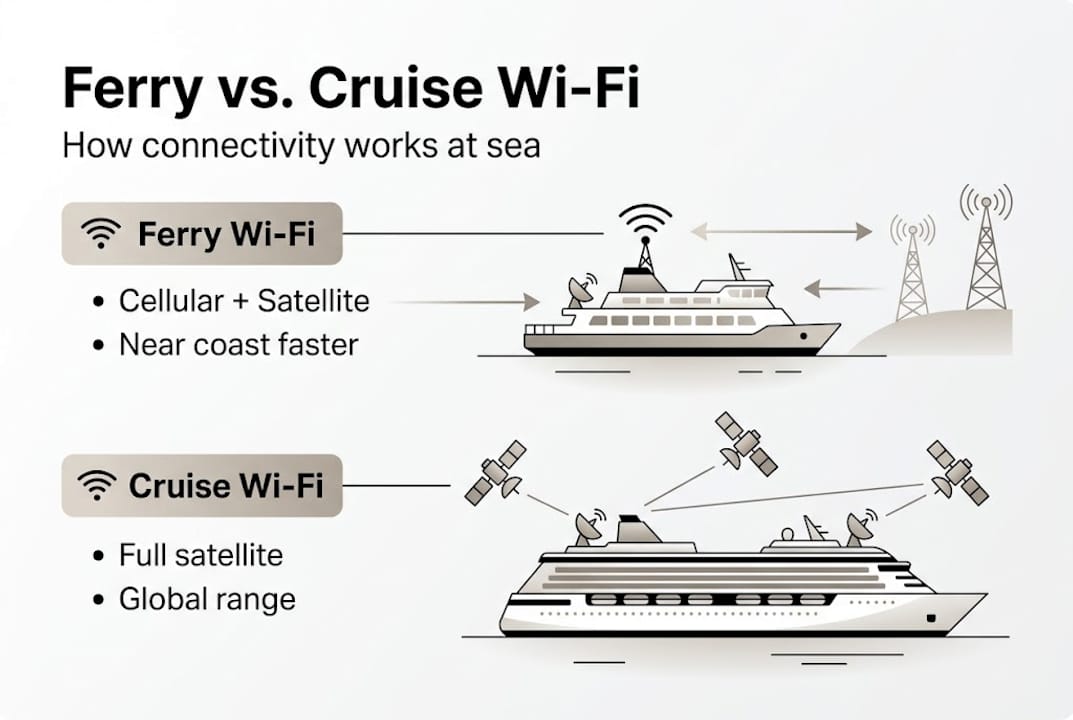
Cruise ships operate differently. They spend most of their time far from any cellular tower, so they depend entirely on satellite systems for the whole journey. Many cruise lines have adopted Starlink, a low-earth-orbit (LEO) satellite network that dramatically reduces the lag and speed limitations of older satellite technology. According to Wi-Fi package comparisons, ferry Wi-Fi primarily uses hybrid cellular and satellite for short coastal trips, while cruise ship Wi-Fi relies on full satellite for open ocean voyages.
A ferry Wi-Fi pilot program in Washington State is already testing public Wi-Fi services, showing just how fast this technology is expanding.
| Feature | Ferry Wi-Fi | Cruise Wi-Fi |
|---|---|---|
| Primary network | Cellular + satellite hybrid | Full satellite (Starlink) |
| Coverage area | Coastal and short routes | Open ocean, global |
| Speed near shore | High (cellular boost) | Consistent, no cellular |
| Speed in open water | Moderate (satellite only) | Consistent (satellite) |
- Ferries offer speed boosts near coast thanks to cellular networks.
- Cruise ships deliver steady satellite coverage throughout the voyage.
- Both increasingly rely on Starlink for improved reliability.
Pro Tip: Check your vessel’s route before boarding. If your ferry stays close to the coast, you may get surprisingly fast speeds. On a cruise, you will always be on satellite, so consider upgrading to a premium package.
Speed and reliability: what you should expect
With the backbone technology mapped out, speed and reliability are next, the key metrics for travelers and remote workers.

The impact of ferry Wi-Fi on the passenger experience has grown significantly as new Starlink-equipped vessels enter service. Wi-Fi benchmarks show cruise ship download speeds at a median of 50 to 100+ Mbps, with the lowest 10th percentile sitting around 21 Mbps. Ferry satellite connections range from 10 to 50 Mbps, but newer Starlink ferries can hit up to 220 Mbps.
For streaming or casual browsing, both types of connections work well. For remote work, video calls, or uploading large files, the difference matters a lot. Cruise ships can slow down during peak hours when thousands of passengers connect simultaneously. Ferries, especially on shorter routes, often have fewer users and faster performance near shore.
In Scotland, faster ferry broadband is already being rolled out, showing that the gap between ferry and cruise Wi-Fi is narrowing faster than most travelers realize. Understanding why high-speed internet matters on ferries helps you choose the right route for your needs.
| Metric | Ferry Wi-Fi | Cruise Wi-Fi |
|---|---|---|
| Typical download speed | 10 to 220 Mbps | 21 to 100+ Mbps |
| Latency | Low near shore, higher offshore | Low with Starlink LEO |
| Peak-hour impact | Low (fewer users) | High (thousands of passengers) |
| Consistency | Variable by location | Generally steady |
Pro Tip: If you need to join video calls on a cruise, check whether your package offers a premium tier. Basic cruise Wi-Fi plans often throttle speeds during busy hours, making video calls frustrating.
Cost and access options for Wi-Fi onboard
Once you know the speeds, it is time for practical budgeting: what you will pay and how to connect onboard.
Cruise ships typically offer tiered pricing with social, basic, and premium plans. Pricing data shows cruise Wi-Fi costs $15 to $40 per day per device, while ferries often charge per trip, with some routes as low as 1,500 yen per 24 hours (roughly $10). Some ferry routes even offer free Wi-Fi for mobile subscribers.
Accessing the network is usually done through a ferry Wi-Fi portal, where you log in and select your plan. Cruise ships may use an app or onboard kiosk. Platforms like Seafy make this process seamless, letting you purchase and activate packages before or during your trip.
Tips for saving on onboard Wi-Fi:
- Book Wi-Fi packages in advance (cruise lines often offer discounts before boarding).
- Check if your mobile carrier offers free or discounted data on certain ferry routes.
- Share a device package with travel companions when the plan allows.
- Use offline apps and downloads before you sail to reduce data needs.
Explore the types of ferry Wi-Fi available so you can match the right solution to your route and budget.
| Access method | Ferry | Cruise |
|---|---|---|
| Voucher or code | Common | Common |
| Onboard portal | Yes (Seafy and others) | Yes |
| Mobile app | Some routes | Most major lines |
| Pre-purchase online | Available | Available |
Edge cases and practical tips for staying connected
Beyond pricing and speed, real-world conditions and best practices can make or break your onboard internet experience.
Ferries perform best when hugging the coastline, where cellular signals can boost speeds dramatically. Move into open water and you rely purely on satellite, which can be slower or interrupted during rough weather. Cruise ships offer steadier coverage overall, but when several thousand passengers all connect at the same time, speeds can drop noticeably. Both vessel types are sensitive to weather events and the ship’s precise geographic position.
If you are working remotely, check out the internet roaming guide and the dedicated guide to Mediterranean ferry Wi-Fi for route-specific advice.
Essential steps for a stable and safe connection:
- Download work files and entertainment before boarding.
- Connect during off-peak hours (early morning or late evening).
- Use a VPN (virtual private network) for secure browsing on public networks.
- Disable background app updates to preserve bandwidth.
- Test your connection as soon as you board so you can troubleshoot early.
Pro Tip: A VPN is recommended on both ferry and cruise Wi-Fi networks. Public maritime networks carry real security risks, and a VPN protects your passwords, emails, and sensitive work data. ⚡
“Both ferries and cruises are converging on Starlink, but their strategies reflect different passenger needs.”
Why understanding onboard Wi-Fi matters now more than ever
Most guides treat ferry and cruise Wi-Fi as roughly the same thing with minor differences. That framing is outdated and genuinely harmful for anyone trying to work or stay connected at sea. Choosing the wrong vessel or package based on vague operator claims can mean a failed deadline, a missed client call, or a week of frustration.
Here is what most travelers miss: both vessel types are evolving fast. Ferry and cruise operators are converging on Starlink LEO technology for reliability, but ferries still leverage coastal cellular for cost savings on short trips, while cruises invest in high-capacity infrastructure to serve thousands of passengers at once. The operational strategy still matters, even as the hardware aligns.
Risks of not preparing:
- Paying for a basic plan that cannot handle video calls.
- Booking a ferry route with poor offshore satellite coverage.
- Assuming free Wi-Fi is sufficient for professional tasks.
Understanding ferry Wi-Fi for productivity helps you plan smarter, not just cheaper.
Pro Tip: Map your connectivity needs before you book. Ask operators which satellite system they use, what peak-hour policies apply, and whether cellular coverage applies on your specific route.
Ready to sail? Get the best Wi-Fi onboard
With clarity on what to expect from Wi-Fi onboard, here is a direct way to make your next trip worry-free.
Sailor or remote worker, the right connection changes everything. Wi-Fi at sea with Seafy means you can browse, stream, and work without guessing what kind of signal you will get. Seafy partners with major ferry lines including Corsica Ferries, Grimaldi Lines, and GNV to deliver fast, secure, and easy-to-activate packages right from your device.

Visit Seafy to compare coverage, check your route, and activate your plan before you even step aboard. Smooth sailing and smooth streaming await. 🌐
Frequently asked questions
How do ferry and cruise ship Wi-Fi networks differ?
Ferry networks use a mix of cellular and satellite, while cruise ships rely mostly on full satellite systems for global coverage. The hybrid ferry approach delivers faster speeds near shore but can vary in open water.
What speeds can I expect on a ferry versus a cruise ship?
Ferry Wi-Fi ranges from 10 to 220 Mbps depending on route and technology, while cruise ships average 50 to 100+ Mbps, though speed may drop during peak hours.
Is ferry Wi-Fi usually cheaper than cruise Wi-Fi?
Ferry Wi-Fi is generally priced per trip and can be cheaper or even free for mobile subscribers, while cruise Wi-Fi costs $15 to $40 per day per device.
Should I use a VPN while using onboard Wi-Fi?
Yes, a VPN adds an essential layer of security whether on ferry or cruise Wi-Fi. A VPN is recommended on all public maritime networks to protect your data.
Do weather or ship position affect Wi-Fi performance?
Yes, both can impact signal quality significantly. Ferries benefit from coastal cellular when close to shore but may lose speed in open water, while cruise ships face congestion from high passenger volumes.